Lecture 11: Rules of Thumb

Brian J. Smith

2026-03-03

Rules of Thumb

This lecture is based on Chapter 6 of Visualization Analysis & Design.


“Rules of Thumb”
Visualization Analysis & Design Cover

Rules of Thumb


This chapter contains advice and guidelines. Dr. Munzner says:


“Each of them has a catchy title in hopes that you’ll remember it as a slogan.”

Rules of Thumb

The 8 Rules of Thumb:

  • No Unjustified 3D
    • The Power of the Plane
    • The Disparity of Depth
    • Occlusion Hides Information
    • Perspective Distortion Dangers
    • Tilted Text Isn’t Legible
  • No Unjustified 2D
  • Eyes Beat Memory
  • Resolution over Immersion
  • Overview First, Zoom and Filter, Detail on Demand
  • Responsiveness is Required
  • Get it Right in Black and White
  • Function First, Form Next

No Unjustified 3D


  • “If two dimensions are good, three dimensions must be better,” is a common misconception.
    • Depth has important differences from the first two spatial dimensions.

No Unjustified 3D

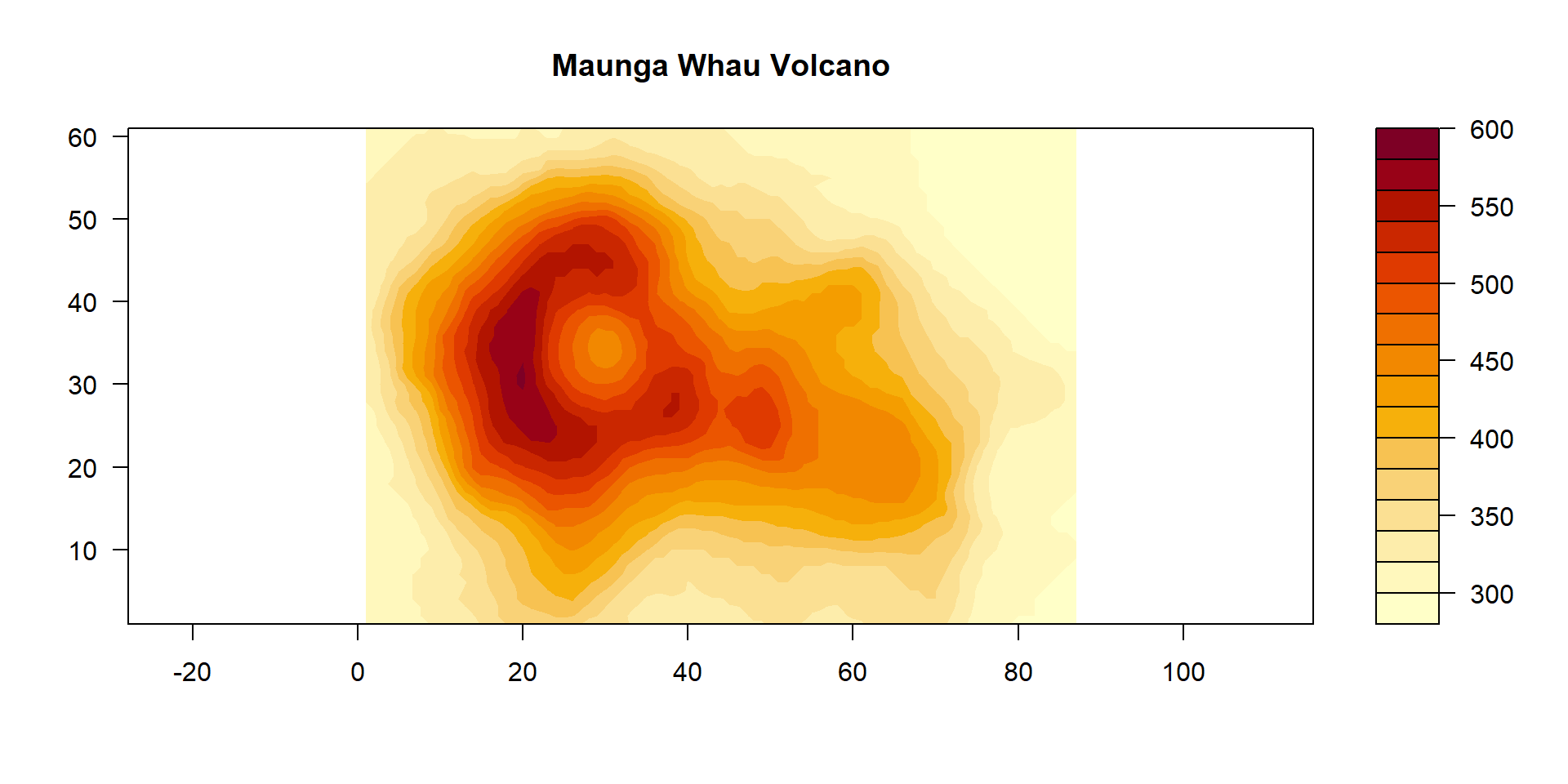
  • 3D viz is easy to justify if the goal involves understanding the shape of inherently 3D structures (e.g., spatial data).
Code
data("volcano")

# Exaggerate relief
z <- volcano * 3

# Plot
filled.contour(x = 1:nrow(z), y = 1:ncol(z), z = z, 
               main = "Maunga Whau Volcano", asp = 1)

See ?filled.contour (base R).

No Unjustified 3D

  • 3D viz is easy to justify if the goal involves understanding the shape of inherently 3D structures (e.g., spatial data).
Code
x <- 10 * (1:nrow(z))   # 10 meter spacing (S to N)
y <- 10 * (1:ncol(z))   # 10 meter spacing (E to W)
## Don't draw the grid lines :  border = NA
par(bg = "slategray3",
    mar = c(0, 0, 3, 0))
persp(x, y, z, theta = 135, phi = 30, col = "green3", scale = FALSE,
      ltheta = -120, shade = 0.75, border = NA, box = TRUE,
       main = "Maunga Whau Volcano")
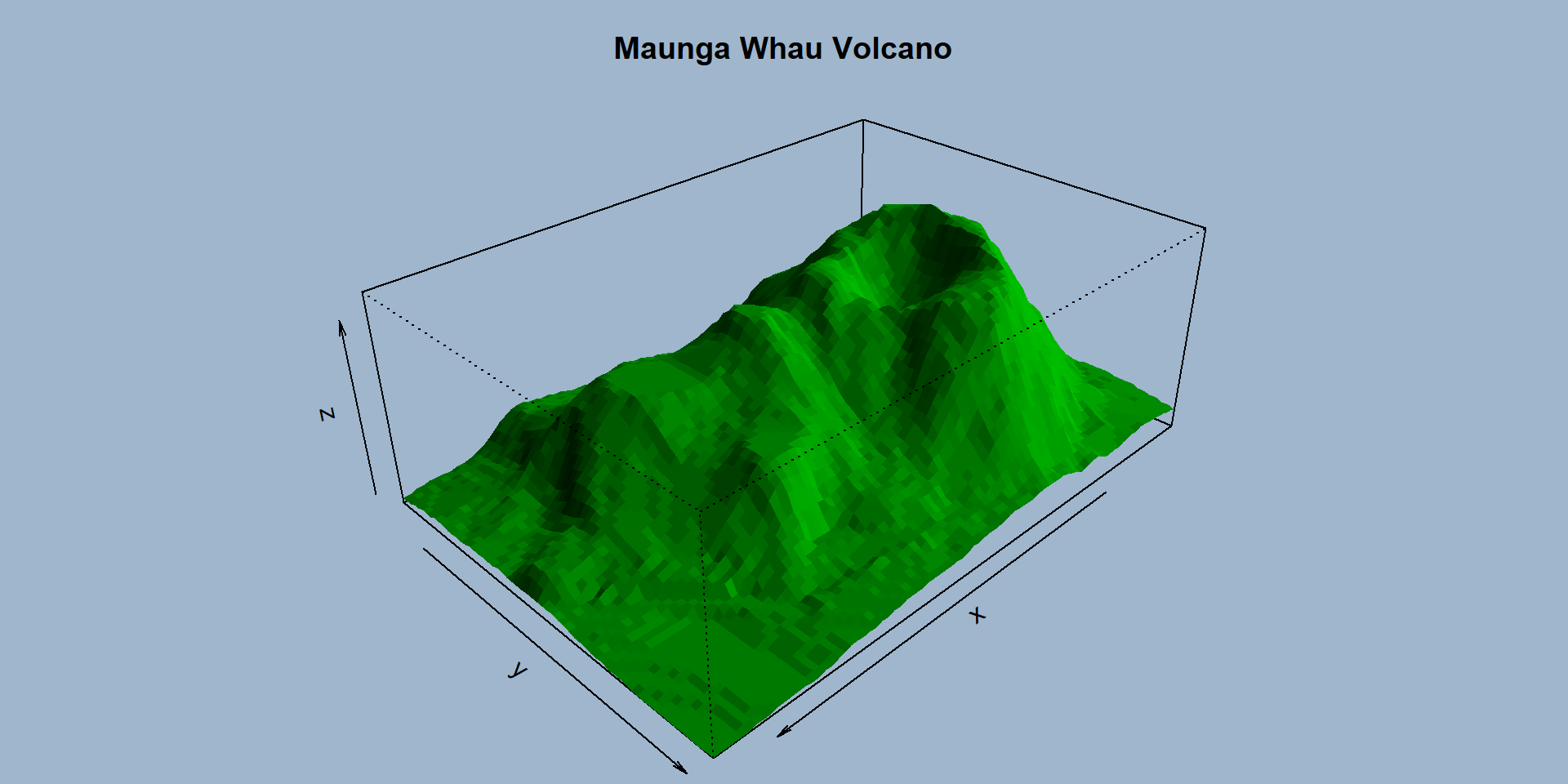
See ?persp (base R).

No Unjustified 3D

  • 3D viz is easy to justify if the goal involves understanding the shape of inherently 3D structures (e.g., spatial data).
Code
library(rgl)

z <- 3 * volcano        # Exaggerate the relief

x <- 10 * (1:nrow(z))   # 10 meter spacing (S to N)
y <- 10 * (1:ncol(z))   # 10 meter spacing (E to W)

zlim <- range(z)
zlen <- zlim[2] - zlim[1] + 1

colorlut <- terrain.colors(zlen) # height color lookup table

col <- colorlut[ z - zlim[1] + 1 ] # assign colors to heights for each point

par3d(windowRect = c(34, 57, 727, 707))
surface3d(x, y, z, color = col, back = "lines")

See ?surface3d (package rgl).

No Unjustified 3D


  • In all other cases, the use of 3D needs to be carefully justified.
  • Mostly, a better choice will be to use only 2 spatial dimensions following some data abstraction.

No Unjustified 3D


  • We judge depth based on cues:
    • Occlusion
    • Perspective distortion
    • Shadows and lighting
    • Familiar size
    • Stereoscopic disparity
    • Others

No Unjustified 3D

The Power of the Plane

  • Vertical and horizontal spatial position are categorized as planar because the differences between up-down and left-right are subtle.
    • We do actually perceive height as more important than horizontal position.
    • But aspect ratio of most displays give more horizontal space, overcoming this.
    • Left-right ordering is probably prioritized based on culture, with most Western languages being read left-to-right.

No Unjustified 3D

The Disparity of Depth

  • We judge depth less accurately than the planar spatial positions.
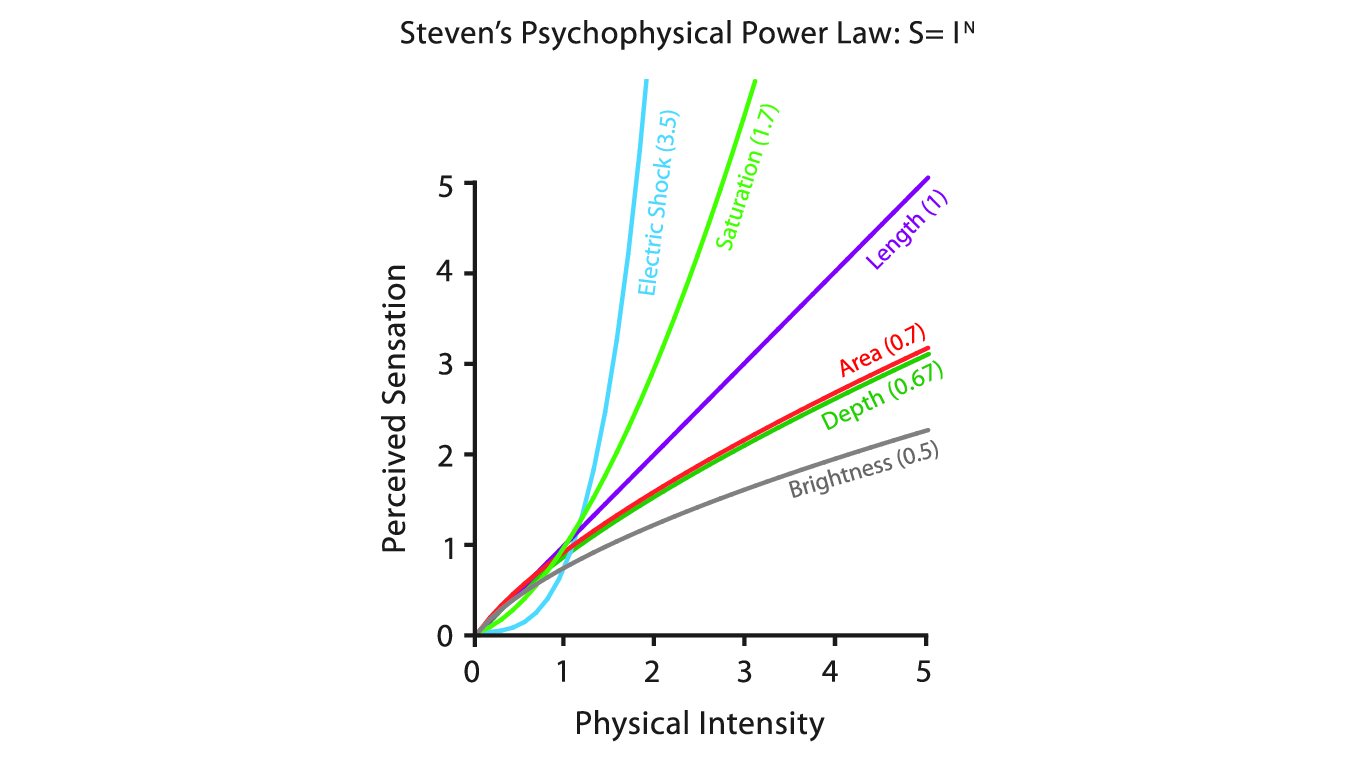
Figure 5.7

No Unjustified 3D

The Disparity of Depth

  • Lines that extend into scenes are scaled non-linearly, while the other two are perfectly linear.
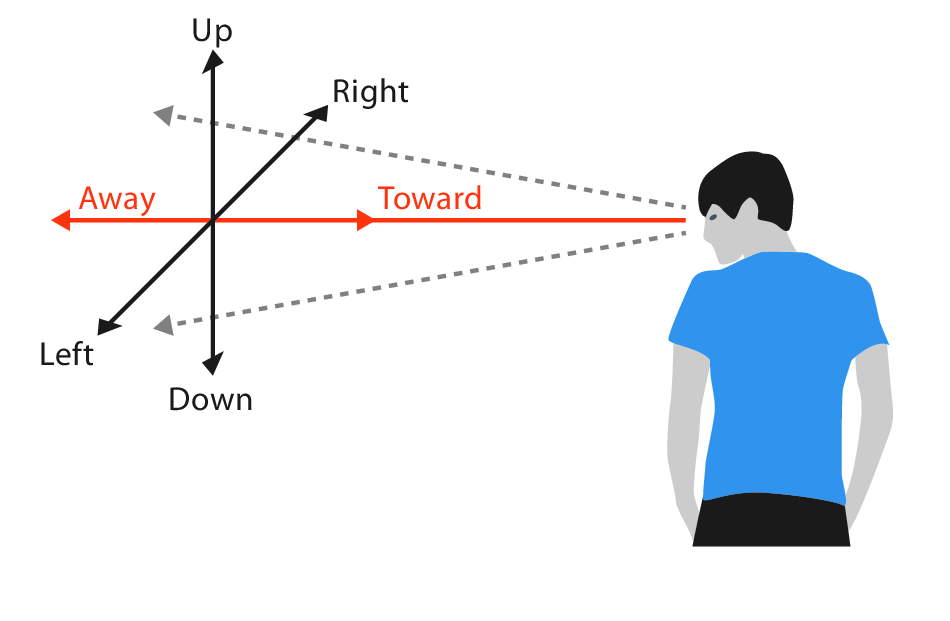
Figure 6.2a

No Unjustified 3D

The Disparity of Depth

  • According to Colin Ware (Ware 2008), we see in 2.05D, since the majority of the information is in the image plane and we see very little depth.
    • The 0.05 is an arbitrary small number.
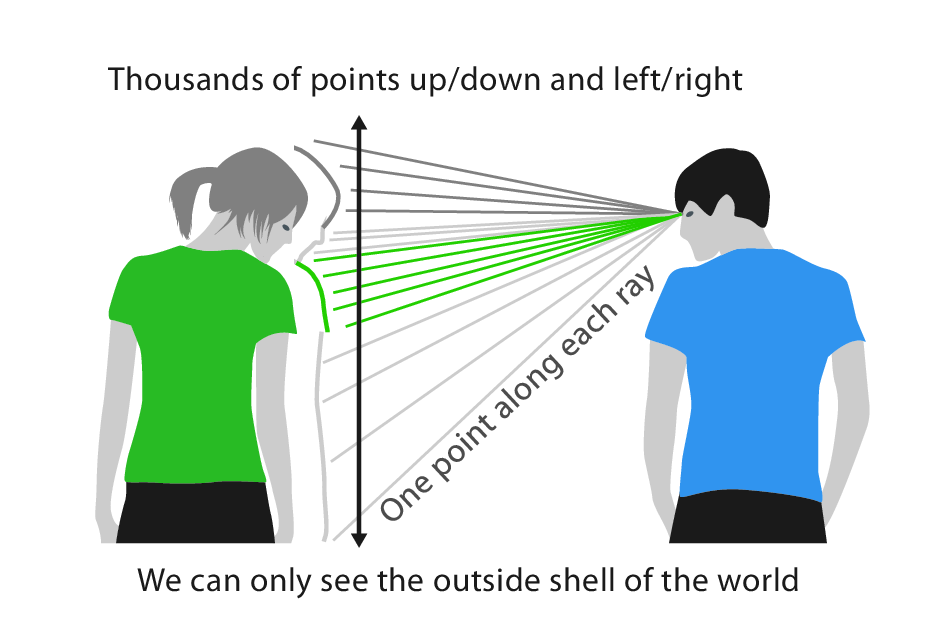
Figure 6.2b

No Unjustified 3D

The Disparity of Depth

  • We can see millions (?) of rays along the planar axes by simply moving our eyes.
  • We only get information about depth at one point along each ray.
    • This is known as line-of-sight ambiguity.

Figure 6.2b

No Unjustified 3D

Occlusion Hides Information

  • Occlusion is the most powerful depth cue, where some objects are hidden behind others.
  • Occlusion relationships between objects change as we move, known as motion parallax.
    • This allows us to build an understanding of relative distances between each other.

No Unjustified 3D

Occlusion Hides Information

  • Occlusion is less effective in static 2D scenes.
    • Interactive navigation lets us use motion parallax to understand depth.

No Unjustified 3D

Occlusion Hides Information

  • Occlusion in realistic scenes (like volcano) is rarely a problem.
    • Often unnecessary to view every angle.
  • But in data viz, an occluded detail might be critical.

No Unjustified 3D

Occlusion Hides Information

  • If objects have unpredictable and unfamiliar shapes, it can be very challenging to understand the 3D-structure of the scene.
3D Network Viz

https://jevansbio.wordpress.com/2019/05/29/plotting-networks-in-blender/

No Unjustified 3D

Perspective Distortion Dangers

  • Perspective distortion is that distant objects appear smaller and change their planar position on the image plane.
    • Important discovery in Western art by Renaissance mathematicians and painters.
    • So, many people think of perspective as a good thing.
  • But for visually encoding data, perspective distortion is a bad thing.
    • E.g., bars on a 3D bar chart are harder to judge.

No Unjustified 3D

Other Depth Cues

  • Familiar objects
    • E.g., we roughly know the size of a car, so when we see a car far away, it helps us judge the size of other objects.
    • For abstract information (i.e., data), we don’t have these cues.

No Unjustified 3D

Other Depth Cues

  • Shadows and surface shading
    • Convey information about depth and shape.
    • Also create visual clutter, distracting from the meaningful data.
    • Can occlude true marks.
    • Can interfere with color channels.

No Unjustified 3D

Other Depth Cues

  • Stereoscopic depth is a cue that comes from the disparities between two images made from camera viewpoints slightly separated in space.
    • Like the separation of our eyes.
    • Stereo vision is actually a relatively weak cue, useful for manipulating objects within arm’s reach.
    • Stereo displays exist, but do not resolve problems with perspective.

No Unjustified 3D

Other Depth Cues

  • Atmospheric perspective is where distant objects are shifted slightly towards blue.
    • Relatively subtle cue.
    • Interferes with color channels.

No Unjustified 3D

Tilted Text Isn’t Legible

  • Text fonts are designed for maximum legibility on the 2D grid of screen pixels.
  • Tilted labels can become blocky and jagged.
  • High-resolution displays help with this.

No Unjustified 2D


  • Similarly, laying out data in 2D should be justified.
  • Why use 2D when a list layout works well?

No Unjustified 2D

  • Lists have strengths:
    • They can show the maximal amount of information in the minimal amount of space.
    • When used in a way that takes up space, they can have notably lower information density.
    • Excellent for lookup tasks, where labels can be ordered appropriately.
      • E.g., alphabetically.

Eyes Beat Memory

  • Using our eyes to switch between views (e.g., panels) has a much lower cognitive load than consulting our memory to compare a current view to what was seen below.
  • Interactive displays usually implicitly rely on memory.
    • A small overview window can help keep track of navigation.

Eyes Beat Memory

Memory and attention

  • Broadly speaking, we have two categories of memory:
    • Long-term memory
      • Can last up to a lifetime
      • No strict upper limit
    • Working memory
      • Lasts several seconds
      • Very limited resource
      • When we experience cognitive load, we will fail to absorb further information

Eyes Beat Memory

Memory and attention

  • Our attention also has “severe” limits.
    • Conscious search for items grows more difficult with the number of items to be checked.
    • Vigilance also degrades with time, meaning we’re worse at searching after a couple of hours than we are at the start of a task.

Eyes Beat Memory

Animation vs. Side-by-Side

  • Some animation idioms impose significant cognitive load because of implicit memory demands.
  • Animation can work well in narrative story telling (e.g., movies).
    • Successfully storytelling deliberately controls the action and directs attention.
    • Data views often have multiple changes at once.
  • Animation is extremely powerful when used for transitions between two dataset configurations.
    • Helps the user maintain context.
    • More effective than jump cuts.
We will talk specifically about animation later in the semester.

Eyes Beat Memory

Change Blindness


“Our visual system works so well that most people have the intuition that we have detailed internal memory of our visual field. However, we do not.”

Eyes Beat Memory

Change Blindness

  • Change blindness occurs when we fail to detect even quite drastic changes to a scene if our attention is directed elsewhere.

“For example, experimenters set up a real-world interactoin where somebody was engaged by a stranger who asked directions, only to be interrupted by people carrying a door who barged in between them. The experimenters orchestrated a switch during this visual interruption, replacing the questioner with another person. Remarkably, most people did not notice, even when the new questioner was dressed completely differently — or was a different gender tahn the old one!”

Resolution over Immersion

  • “Pixels are precious”
    • Resolution is far more important than immersion.
  • Immersive environments emphasize realism and perception.
  • Displays focused on immersion (e.g., virtual reality devices) often have low resolution.
    • Technology might have advanced now, but this doesn’t seem relevant to us.

Overview First, Zoom and Filter, Details on Demand

  • Mantra of Ben Shneiderman (Shneiderman 1996)
  • An overview gives the user broad awareness of the entire information space.
    • Goal is to summarize.
    • Useful at the beginning of exploration.
  • Zooming and filtering can make it easier to display all the information at once.

Overview First, Zoom and Filter, Details on Demand

Code
library(leaflet)
library(amt) # animal movement tools

# Data on the mesocarnivore "fisher"
data("amt_fisher")

# Creates a leaflet map
inspect(amt_fisher)

Overview First, Zoom and Filter, Details on Demand

  • This mantra is useful for moderately-sized datasets.
  • For larger datasets, an alternative is “Search, Show Context,”Expand on Demand”.

Responsiveness is Required

  • The latency of interaction is how much time it takes for the system to respond to user action.
  • Matters immensely for interaction design.
  • Largely irrelevant to us in this class.

Get it Right in Black and White

  • Advocated by Maureen Stone (Stone 2010, but see also this blog).
  • Ensure most crucial aspects of visual representation are legible even if the image is transformed to B&W.
    • Use luminance first.
    • Use hue/saturation as secondary channels.

Function First, Form Next

  • We want our visualizations to shine in both form (beauty) and function (effectiveness).
  • Nevertheless, focus on function first.
  • Easier to improve an ugly design than maintain form while changing function.
    • Often beautiful but ineffective designs need to be started over from scratch.

Questions?


BCB5200 Home