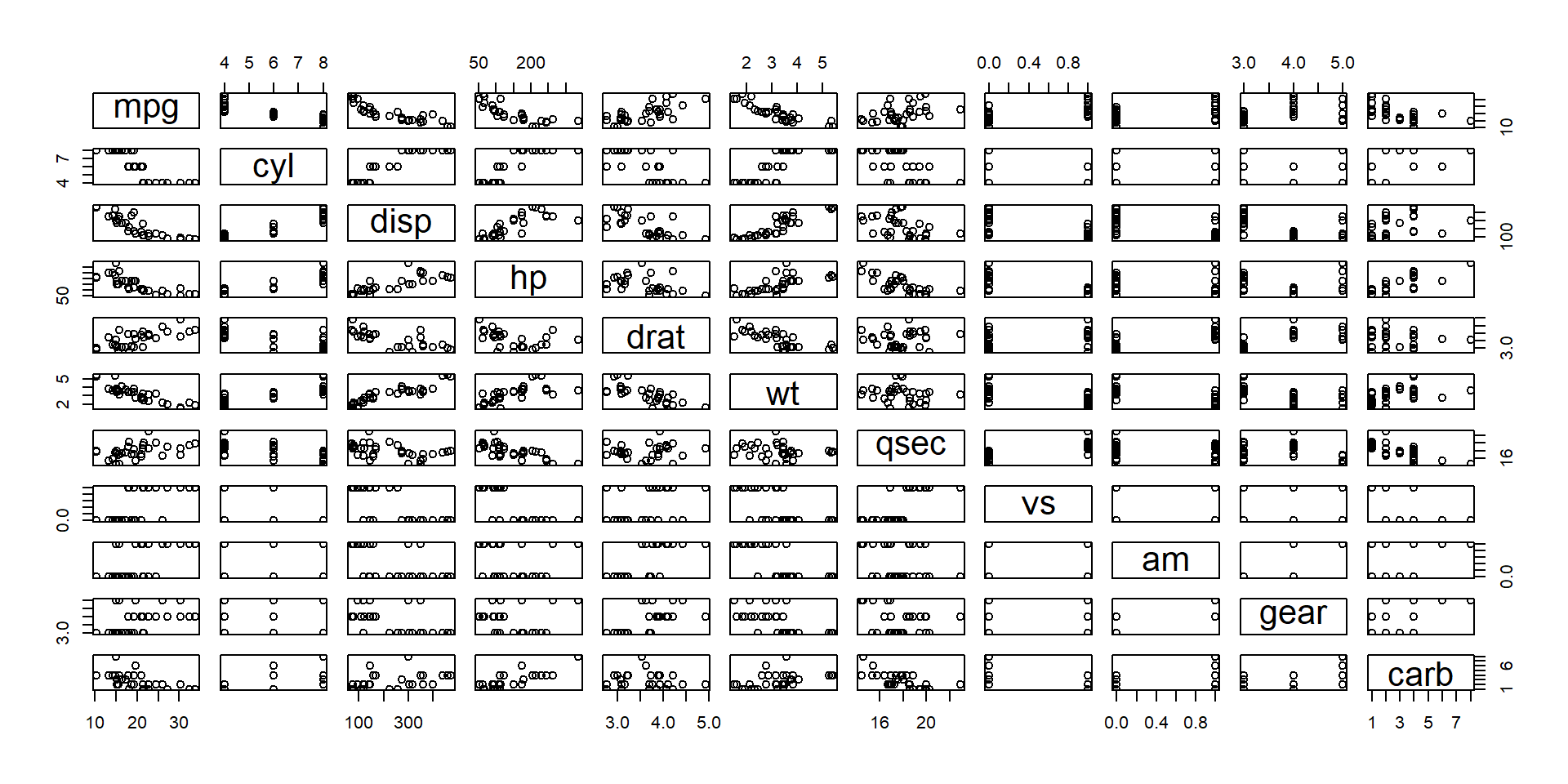
Lecture 14: Reducing Items and Attributes
2026-03-26
Reducing Items and Attributes
The beginning of this lecture is based on Chapter 13 of Visualization Analysis & Design.
“Reduce Items and Attributes”
For this lecture, I’m going to start with the VAD Text, then transition over to R.

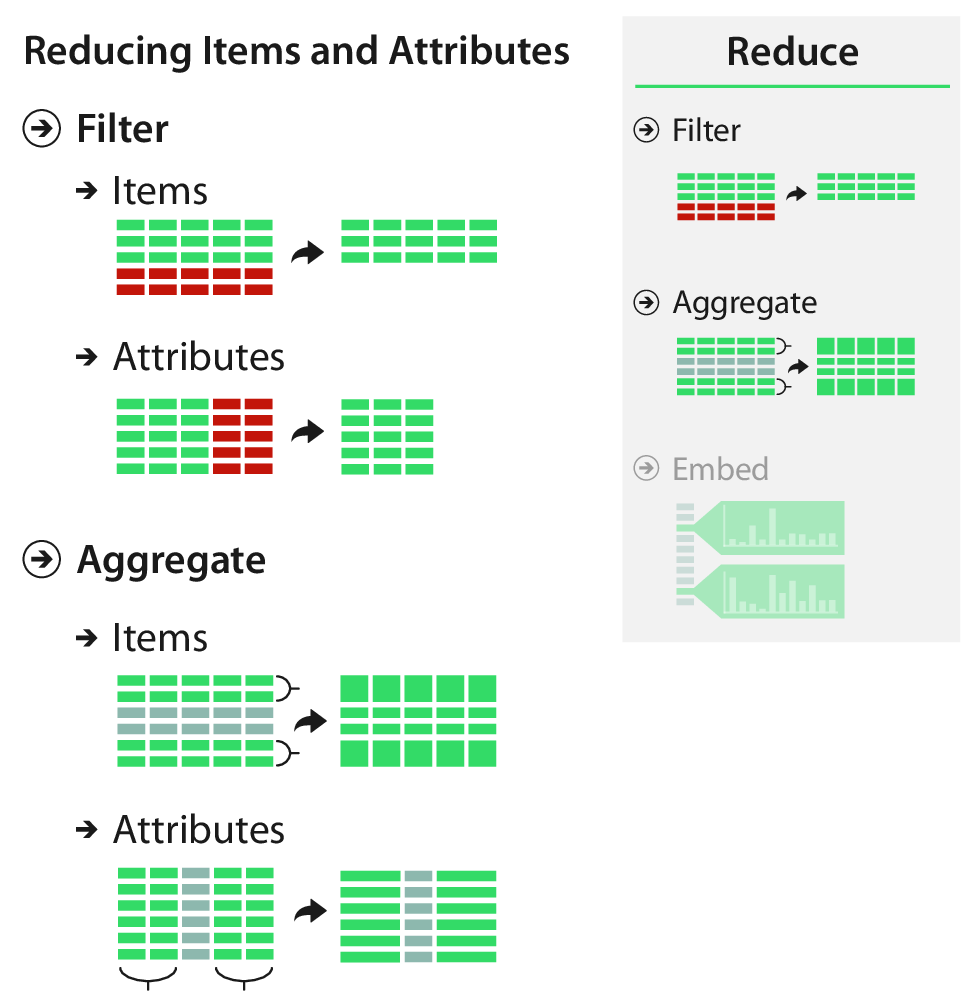
Filtering
Attribute Filtering
- This may be combined with attribute ordering.
- Orders attributes based on their similarity.
- E.g., highly correlated attributes show some redundant information.
Code
a <- mtcars %>%
  ggplot(aes(x = disp, y = hp)) +
  geom_point() +
  geom_label(x = 150, y = 300,
             label = paste("r =",
                           round(cor(mtcars$disp,
                                     mtcars$hp,
                                     method = "spearman"),
                                 2))) +
  geom_smooth(method = "lm", se = FALSE) +
  theme_classic()

b <- mtcars %>%
  ggplot(aes(x = disp, y = mpg)) +
  geom_point() +
  theme_classic()

c <- mtcars %>%
  ggplot(aes(x = hp, y = mpg)) +
  geom_point() +
  theme_classic()

des <- "AB
        AC"

a + b + c + plot_layout(widths = c(0.3, 0.7),
                        design = des)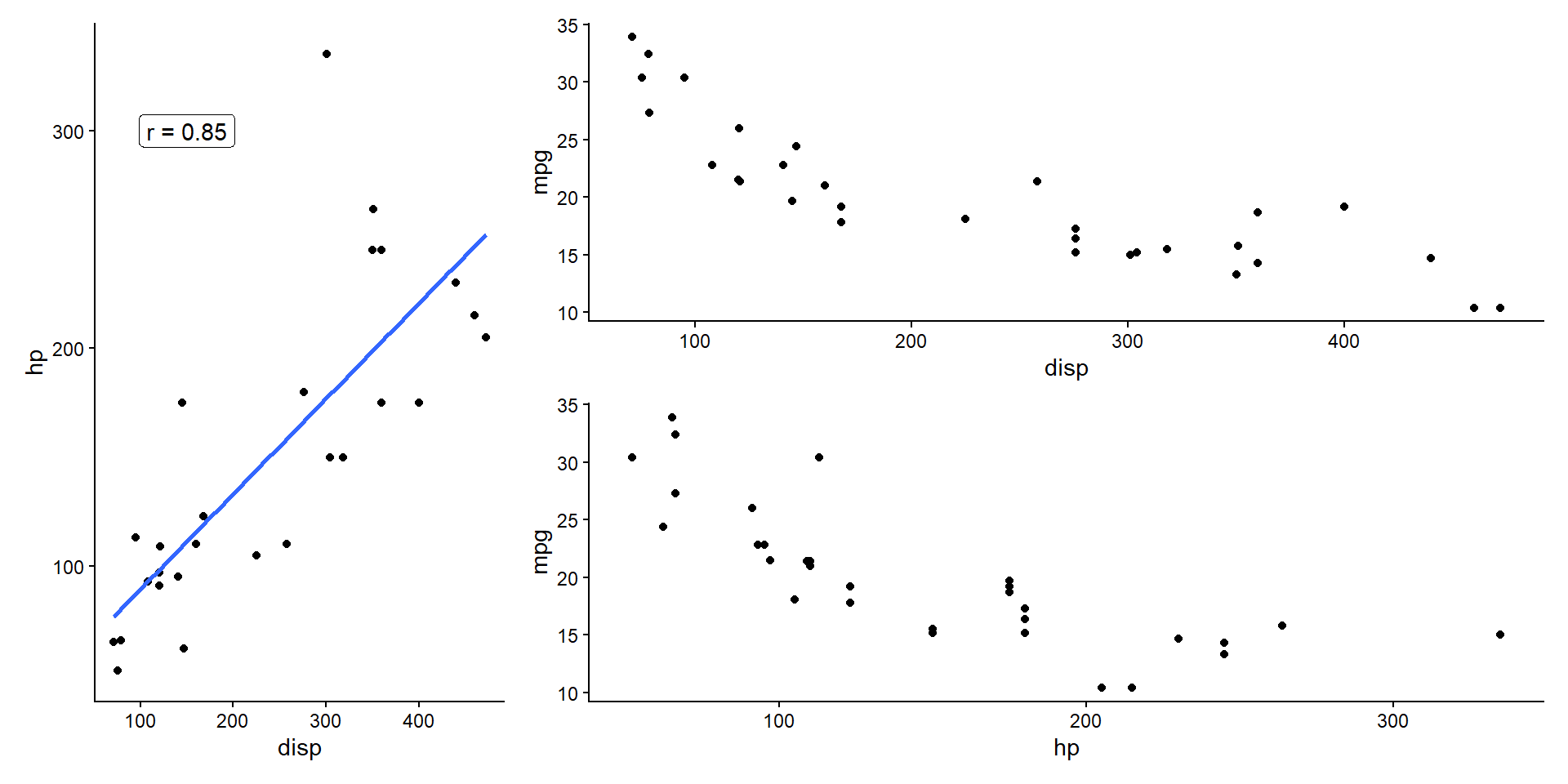
Filtering
Item Filtering
- Filter items based on values.
- E.g., remove outliers or extreme values.
Code
data("starwars")

a <- starwars %>%
  ggplot(aes(x = height, y = mass)) +
  geom_point() +
  coord_cartesian(xlim = c(50, 250)) +
  ggtitle("Without Filtering") +
  theme_classic()

b <- starwars %>%
  filter(mass < 500) %>%
  ggplot(aes(x = height, y = mass)) +
  geom_point() +
  coord_cartesian(xlim = c(50, 250)) +
  ggtitle("Filter Extreme Values") +
  theme_classic()

a/b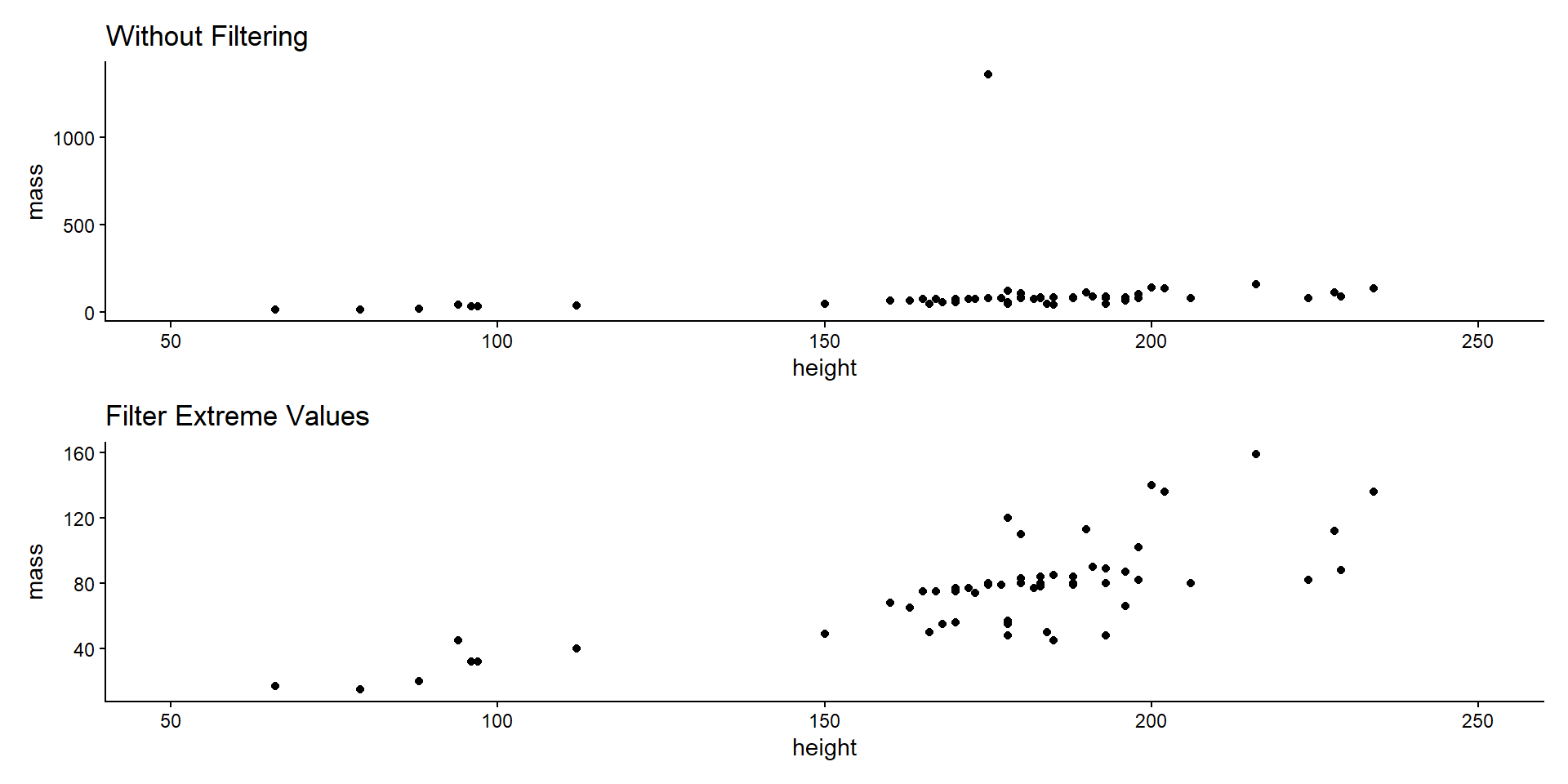
Aggregation
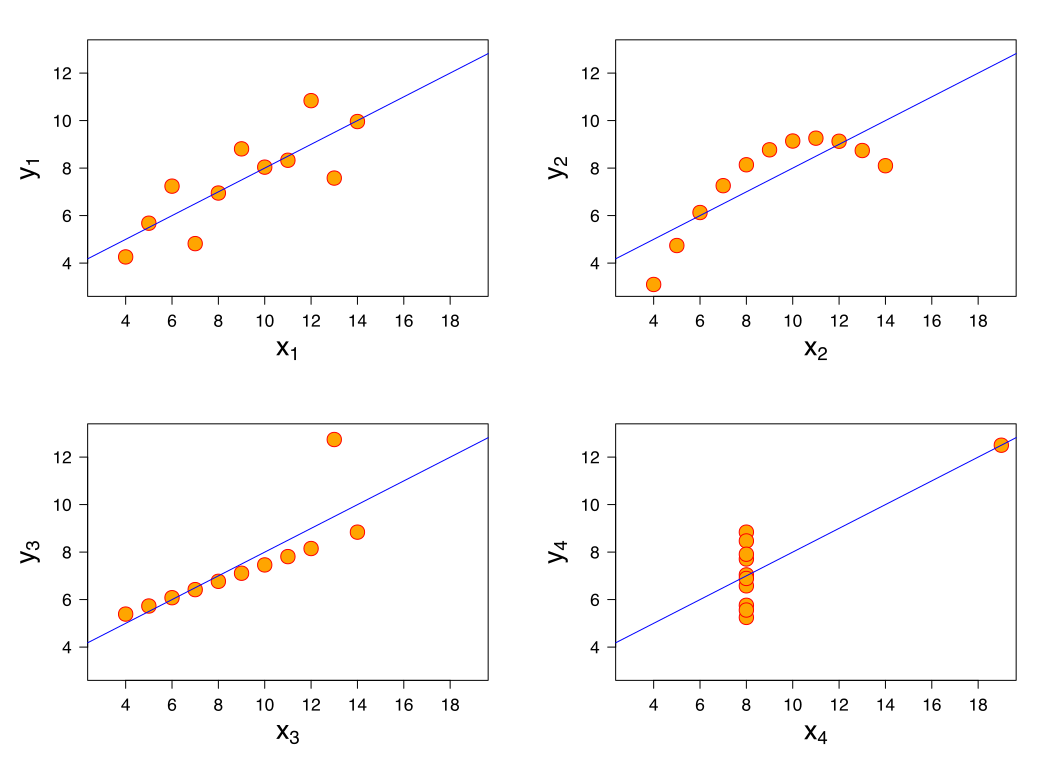
- Creating a new derived element to represent the group.
- Simple examples include summary statistics.
- Remember Anscombe’s Quartet!
Aggregation
Item Aggregation
1D Summary Stats
Code
a <- starwars %>%
  filter(mass < 500) %>%
  ggplot(aes(x = 0, y = mass)) +
  geom_point(show.legend = FALSE) +
  ggtitle("Without Aggregation") +
  labs(x = NULL, y = "Mass") +
  theme_classic() +
  theme(axis.text.x = element_text(angle = 45, hjust = 1))

b <- starwars %>%
  filter(mass < 500) %>%
  ggplot(aes(y = mass)) +
  geom_boxplot(show.legend = FALSE) +
  ggtitle("Aggregate with Summary Stats (Boxplot)") +
  labs(x = NULL, y = "Mass") +
  theme_classic() +
  theme(axis.text.x = element_text(angle = 45, hjust = 1))

a/b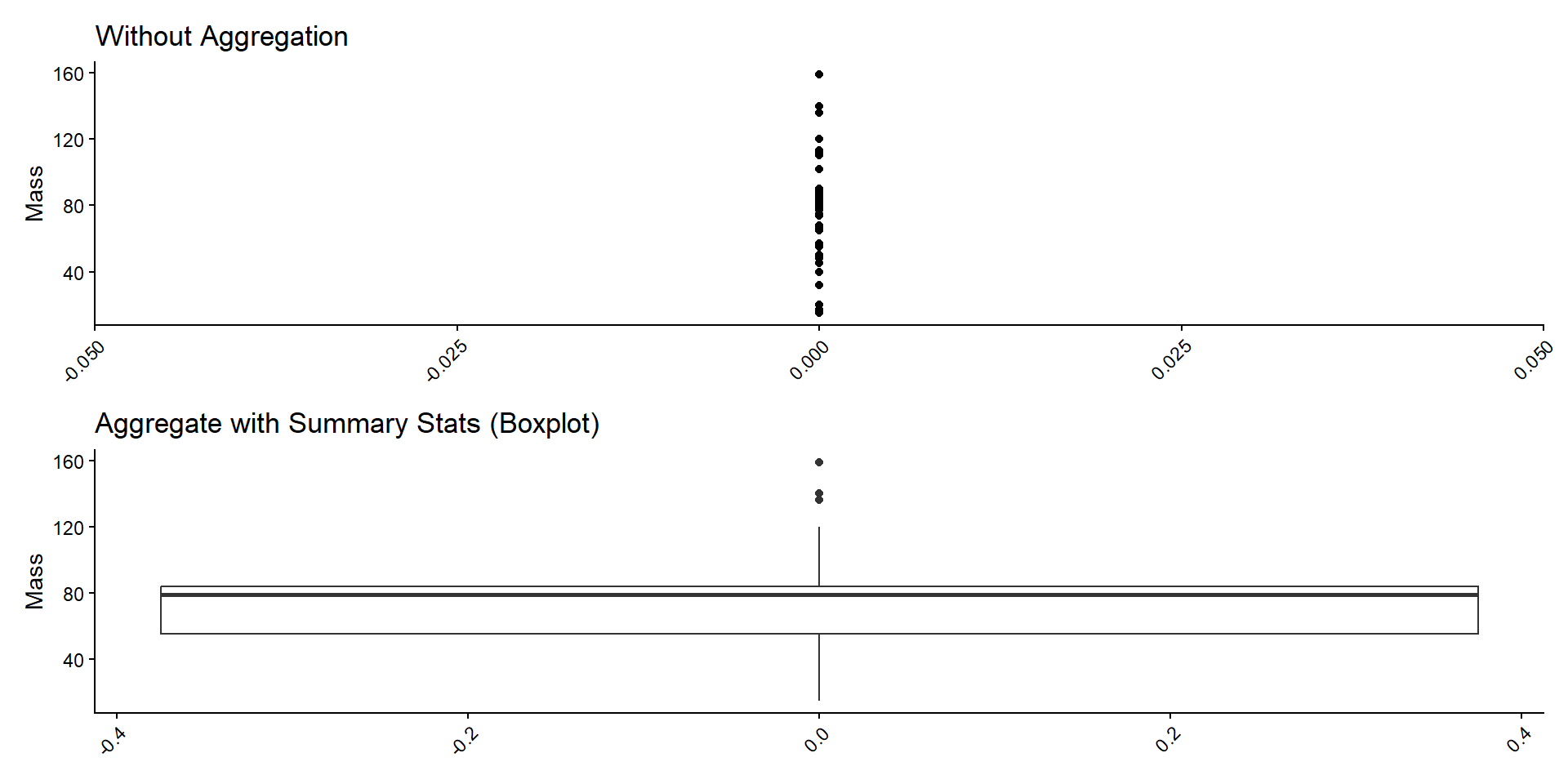
Aggregation
Item Aggregation
2D Summary Stats
Code
spp <- starwars %>%
  filter(!is.na(species)) %>%
  count(species) %>%
  filter(n > 1)

sw <- starwars %>%
  filter(species %in% spp$species) %>%
  mutate(species = factor(species))

a <- sw %>%
  ggplot(aes(x = species, y = mass, color = species)) +
  geom_point(show.legend = FALSE) +
  ggtitle("Without Aggregation") +
  labs(x = "Species", y = "Mass") +
  theme_classic() +
  theme(axis.text.x = element_text(angle = 45, hjust = 1))

b <- sw %>%
  ggplot(aes(x = species, y = mass,
             color = species)) +
  geom_boxplot(show.legend = FALSE) +
  ggtitle("Aggregate by Species (Boxplot)") +
  labs(x = "Species", y = "Mass") +
  theme_classic() +
  theme(axis.text.x = element_text(angle = 45, hjust = 1))

a/b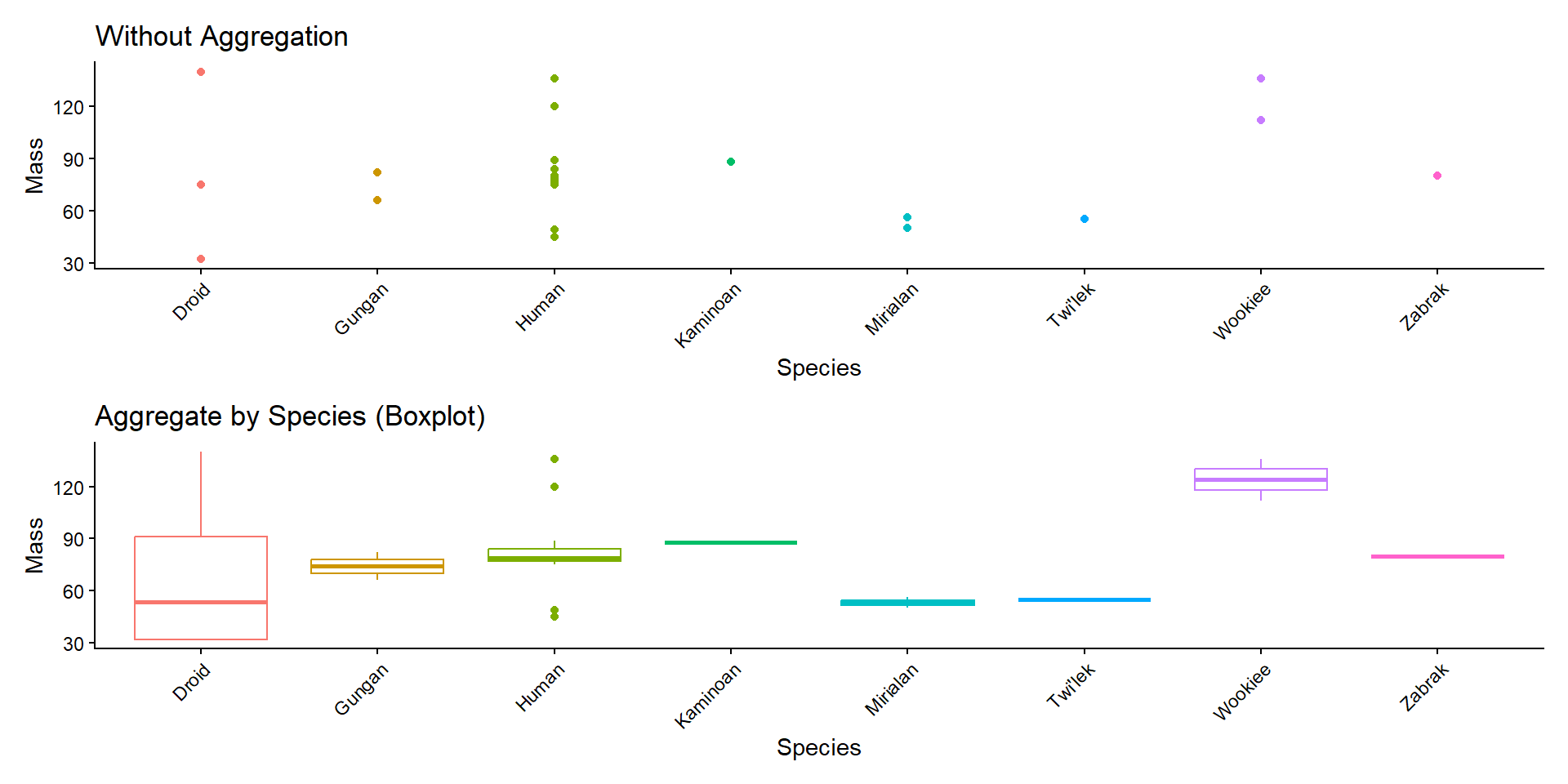
Aggregation
Item Aggregation
3D Summary Stats
Code
# 'sw' created on previous slide

a <- sw %>%
  ggplot(aes(x = height, y = mass, color = species)) +
  geom_point(show.legend = FALSE) +
  coord_cartesian(xlim = c(50, 250)) +
  ggtitle("Without Aggregation") +
  labs(x = "Height", y = "Mass") +
  theme_classic()

b <- sw %>%
  group_by(species) %>%
  summarize(mass_mean = mean(mass, na.rm = TRUE),
            mass_sd = sd(mass, na.rm = TRUE),
            height_mean = mean(height, na.rm = TRUE),
            height_sd = sd(height, na.rm = TRUE)) %>%
  mutate(mass_lwr = mass_mean - mass_sd,
         mass_upr = mass_mean + mass_sd,
         height_lwr = height_mean - height_sd,
         height_upr = height_mean + height_sd) %>%
  ggplot(aes(x = height_mean, y = mass_mean,
             color = species)) +
  geom_errorbar(aes(xmin = height_lwr, xmax = height_upr),
                width = 5) +
  geom_errorbar(aes(ymin = mass_lwr, ymax = mass_upr),
                width = 2) +
  geom_point(size = 2) +
  coord_cartesian(xlim = c(50, 250)) +
  ggtitle("Aggregate by Species (mean +/- SD)") +
  labs(x = "Height", y = "Mass") +
  theme_classic()

a/b + plot_layout(guides = "collect")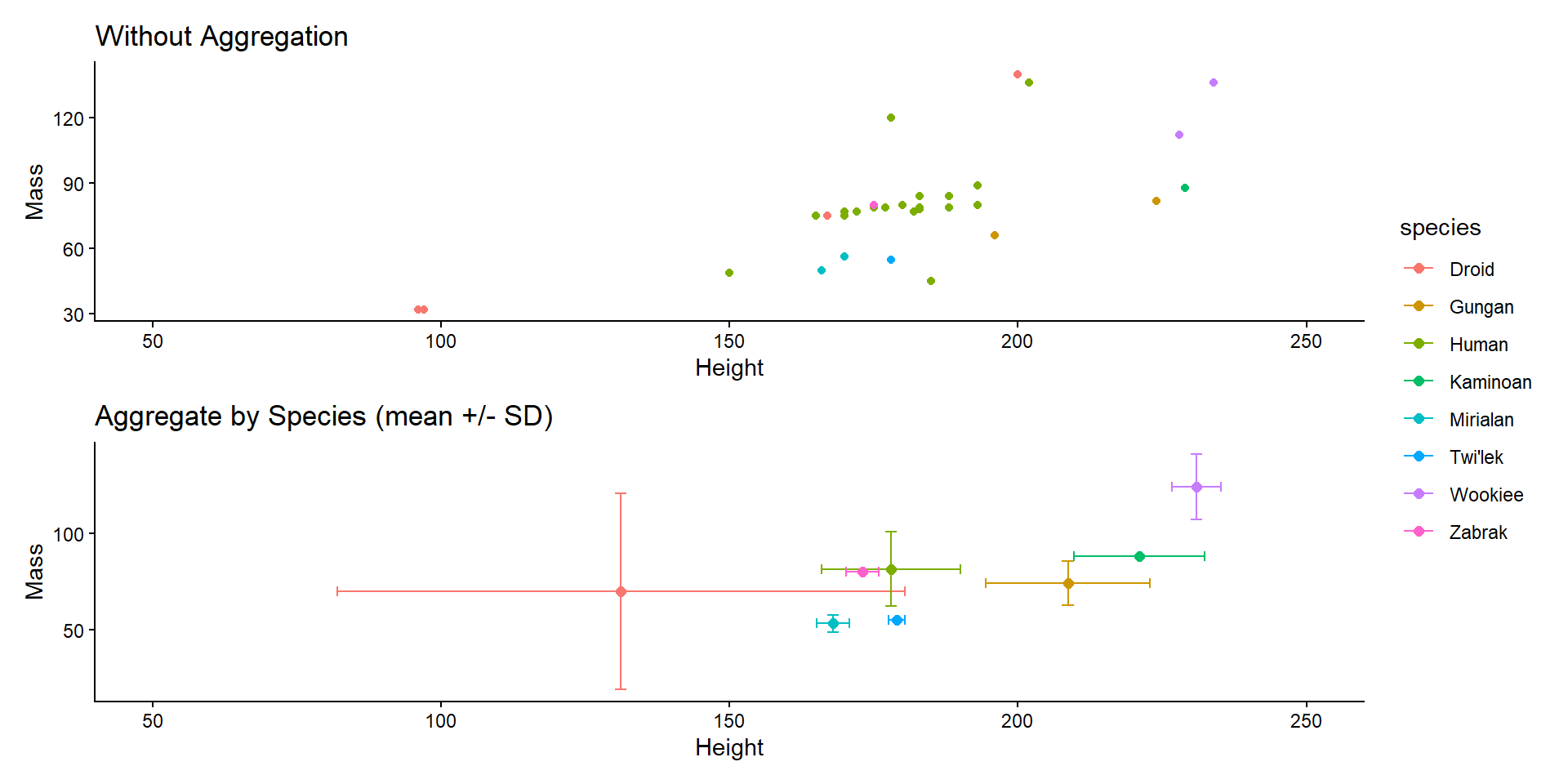
Aggregation
Item Aggregation
1D Counts/Densities
Code
a <- starwars %>%
  filter(mass < 500) %>%
  ggplot(aes(y = 0, x = height)) +
  geom_point(show.legend = FALSE) +
  ggtitle("Without Aggregation") +
  labs(x = "Height", y = NULL) +
  theme_classic()

b <- starwars %>%
  filter(mass < 500) %>%
  ggplot(aes(x = height)) +
  geom_histogram(bins = 15, color = "black", fill = "gray") +
  ggtitle("Aggregate with Counts (Histogram)") +
  labs(x = "Height", y = "Count") +
  theme_classic()

c <- starwars %>%
  filter(mass < 500) %>%
  ggplot(aes(x = height)) +
  geom_density(color = "black", fill = "gray") +
  ggtitle("Aggregate with Density (KDE)") +
  labs(x = "Height", y = "Density") +
  theme_classic()

a/(b+c)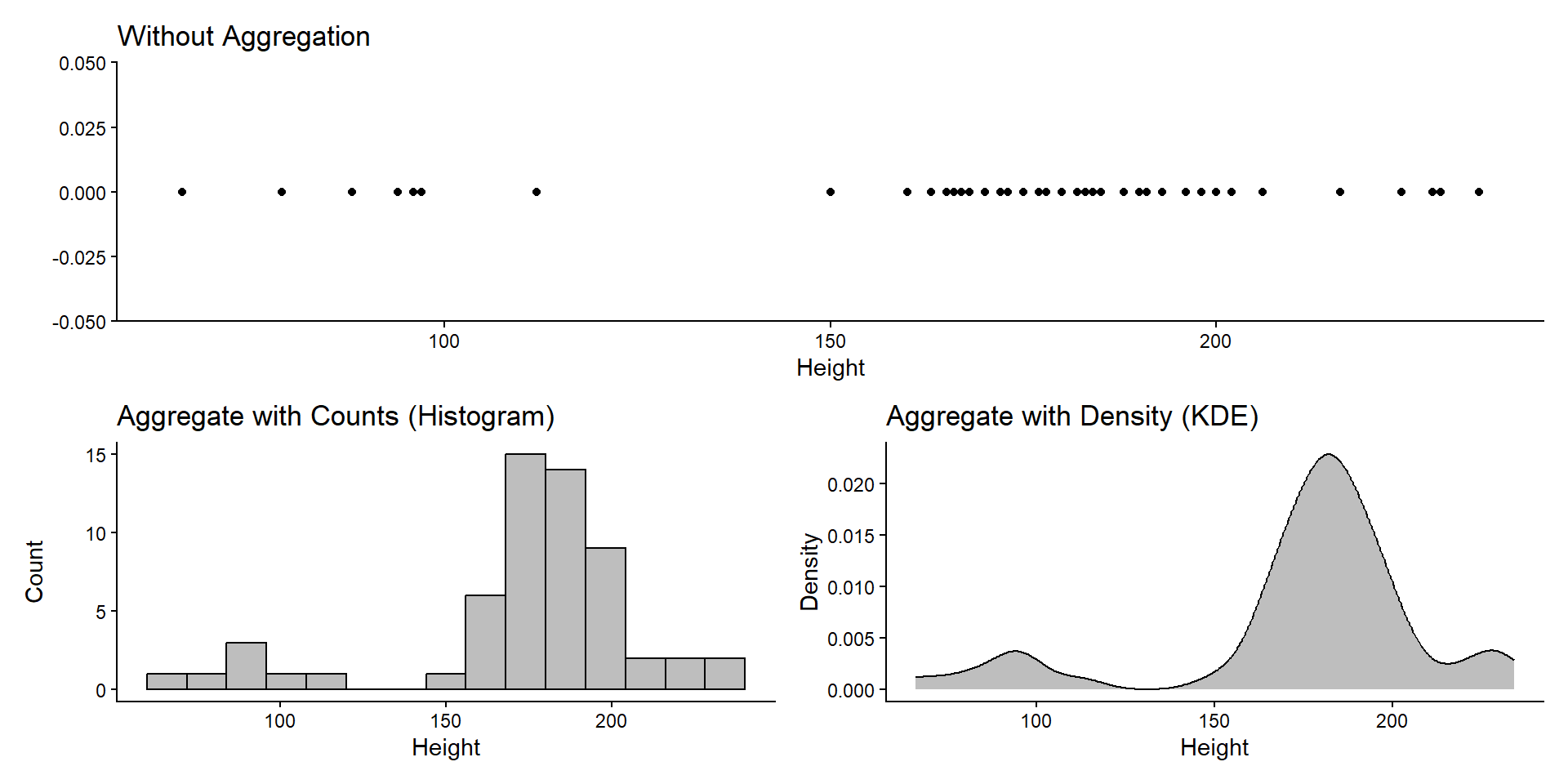
Aggregation
Item Aggregation
2D Summary Stats
Code
# 'sw' created on an earlier slide

a <- sw %>%
  ggplot(aes(x = species, y = mass, color = species)) +
  geom_point(show.legend = FALSE) +
  ggtitle("Without Aggregation") +
  labs(x = "Species", y = "Mass") +
  theme_classic() +
  theme(axis.text.x = element_text(angle = 45, hjust = 1))

b <- sw %>%
  filter(!is.na(mass)) %>%
  mutate(mass_bin = cut_number(mass, n = 5)) %>%
  group_by(species, mass_bin) %>%
  tally() %>%
  ggplot(aes(x = species, y = mass_bin,
             fill = n)) +
  geom_raster() +
  ggtitle("Aggregate with Counts (Heatmap)") +
  labs(x = "Species", y = "Mass") +
  scale_fill_viridis_c() +
  theme_classic() +
  theme(axis.text.x = element_text(angle = 45, hjust = 1))

a/b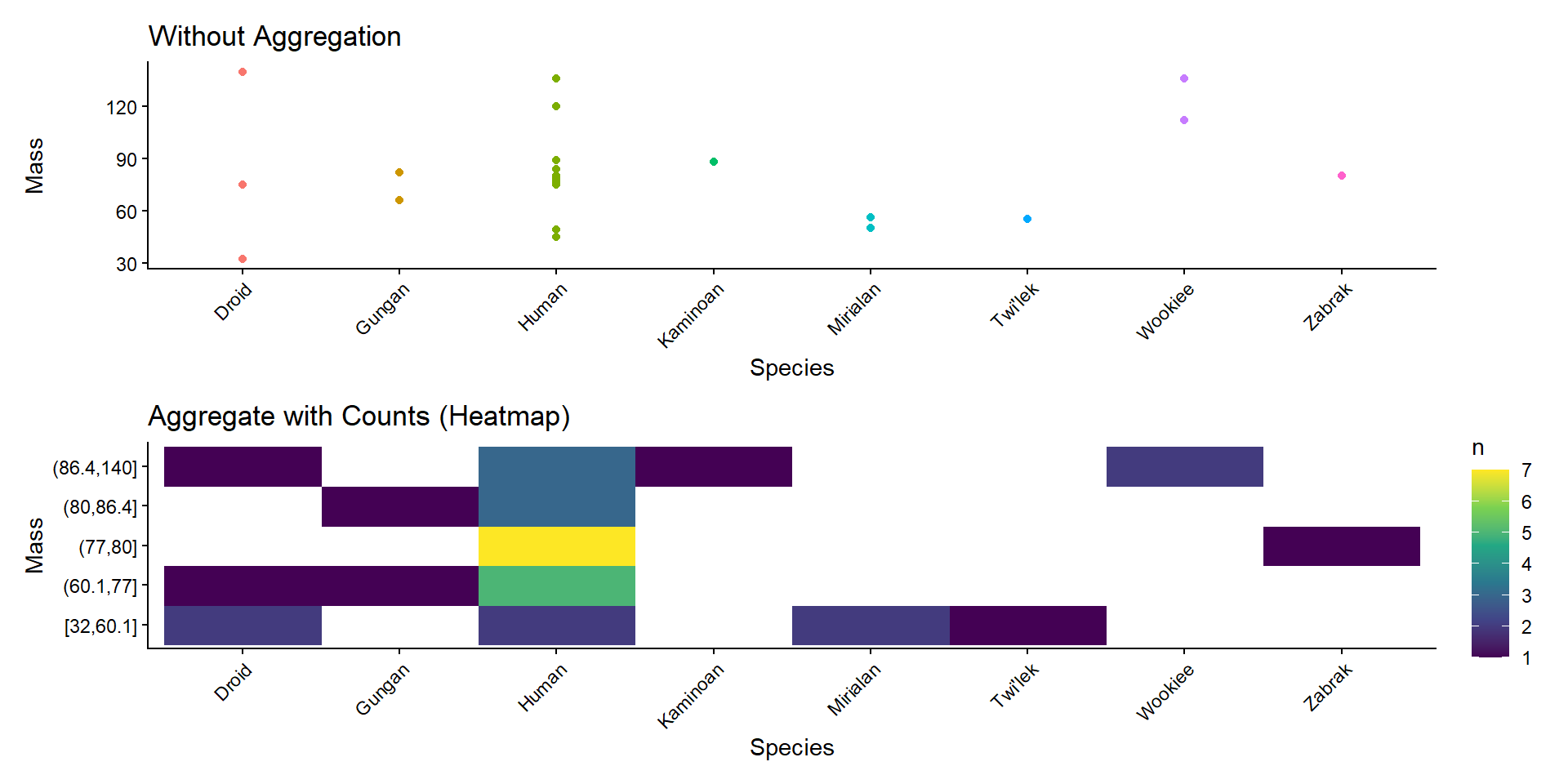
Aggregation
Item Aggregation
2D Summary Stats
Code
# 'sw' created on an earlier slide

a <- sw %>%
  ggplot(aes(x = height, y = mass)) +
  geom_point(show.legend = FALSE) +
  ggtitle("Without Aggregation") +
  labs(x = "Height", y = "Mass") +
  theme_classic()

b <- sw %>%
  filter(!is.na(mass)) %>%
  ggplot(aes(x = height, y = mass)) +
  geom_density_2d_filled(show.legend = FALSE) +
  ggtitle("Aggregate with Density (2D KDE)") +
  labs(x = "Height", y = "Mass") +
  scale_fill_viridis_d() +
  theme_classic()

a/b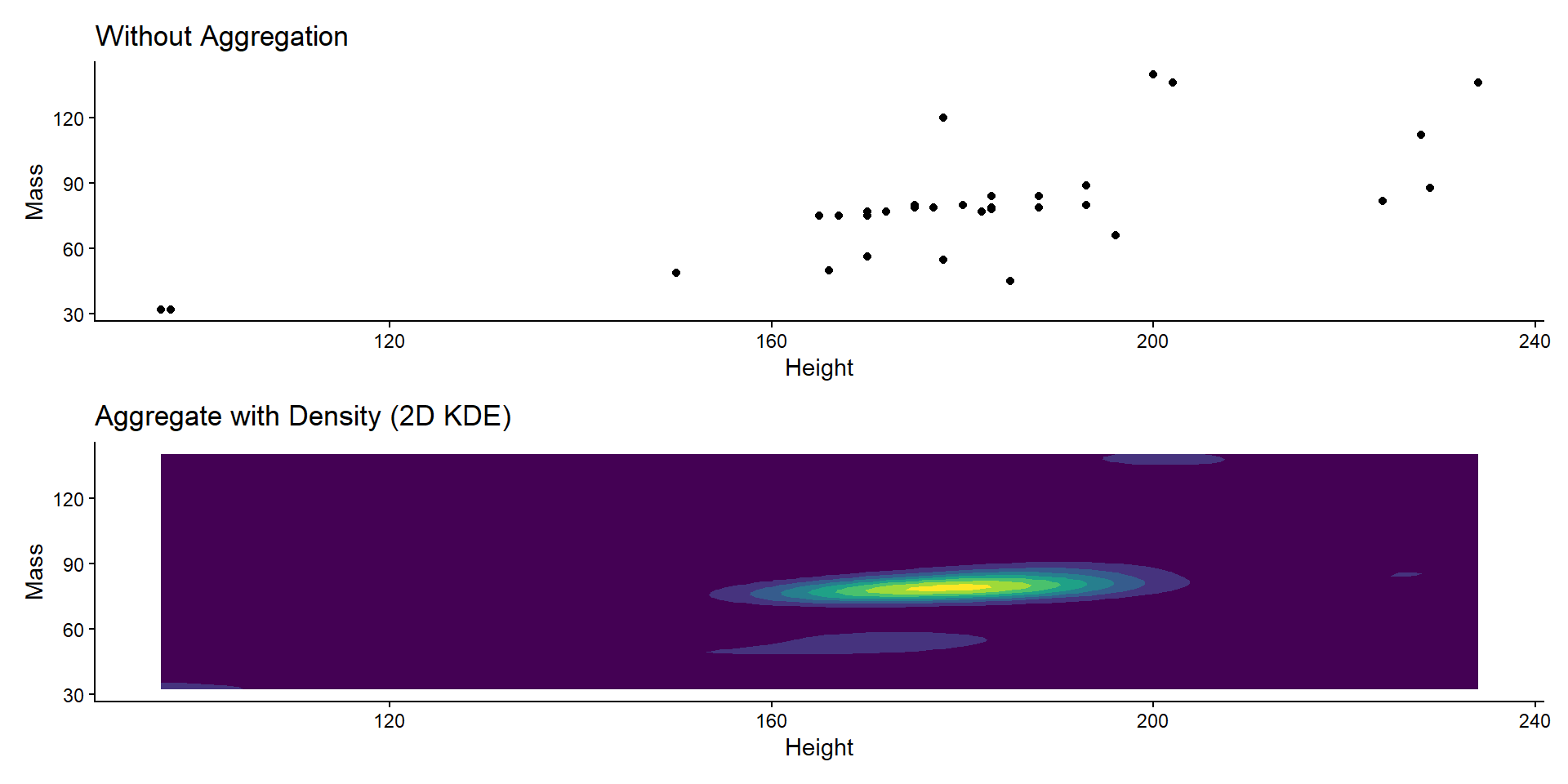
Aggregation
Attribute Aggregation
- Simple solution:
\[BMI = kg/m^2\]
Code
# 'sw' created on previous slide

a <- sw %>%
  ggplot(aes(x = height, y = mass, color = species)) +
  geom_point() +
  coord_cartesian(xlim = c(50, 250)) +
  ggtitle("Without Aggregation") +
  labs(x = "Height", y = "Mass") +
  theme_classic()

b <- sw %>%
  mutate(bmi = mass/(height^2)) %>%
  ggplot(aes(x = species, y = bmi,
             color = species)) +
  geom_boxplot(show.legend = FALSE) +
  ggtitle("Aggregate with BMI") +
  labs(x = "Species", y = "BMI") +
  theme_classic() +
  theme(axis.text.x = element_text(angle = 45, hjust = 1))

a / b + plot_layout(guides = "collect")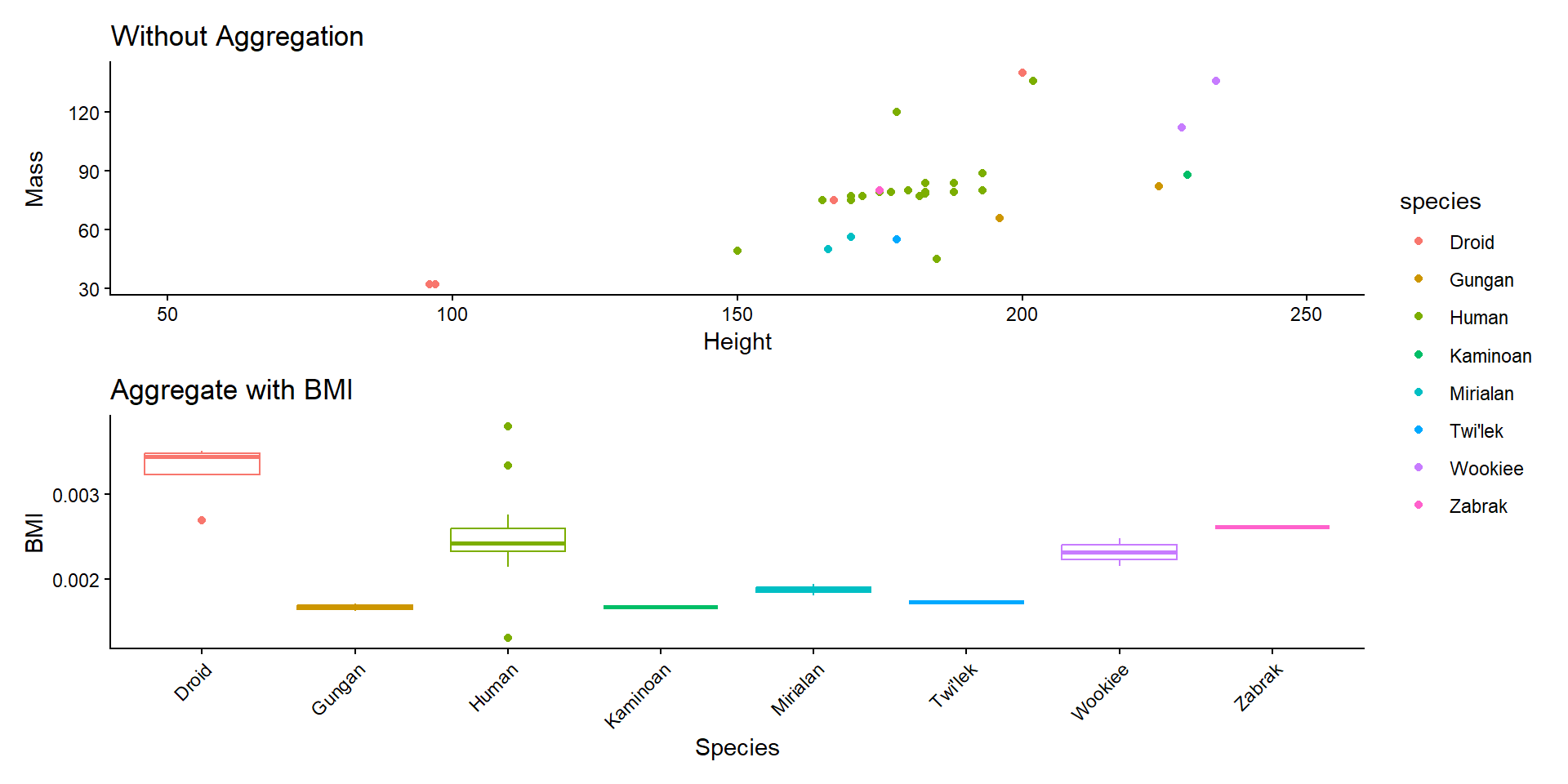
Aggregation
Attribute Aggregation
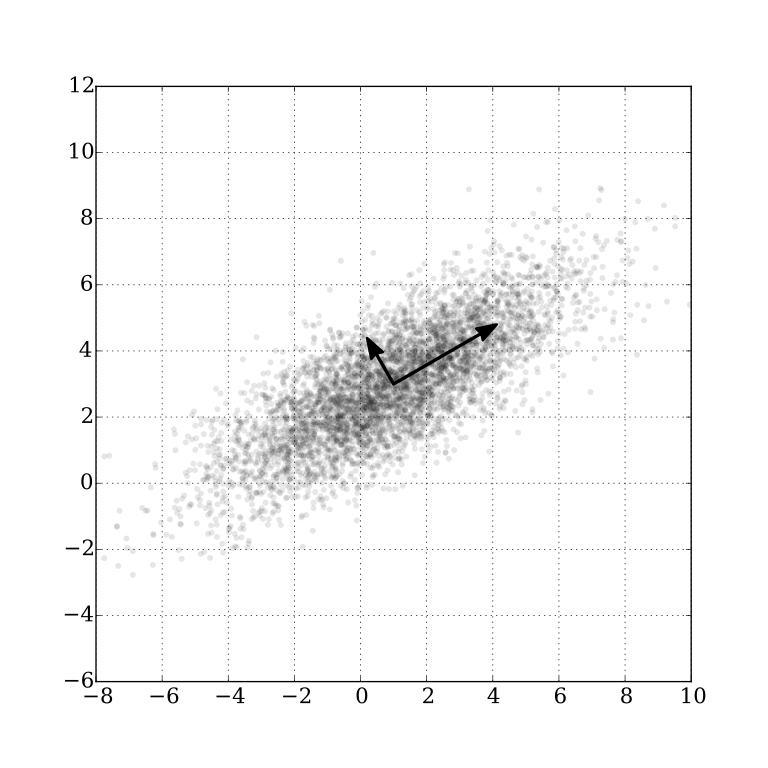
Aggregation
Attribute Aggregation
PCA
Code
# 'sw' created earlier; adding BMI here
sw <- sw %>%
  mutate(bmi = mass/height^2)

pca <- prcomp(~ height + mass, data = sw)
pred <- predict(pca, sw)
sw$pc1 <- pred[, 1]

par(mfrow = c(1, 2))
biplot(pca)
summ <- summary(pca)
barplot(summ$importance[2, ],
        ylim = c(0, 1), ylab = "Proportion",
        main = "Variance Explained")
box()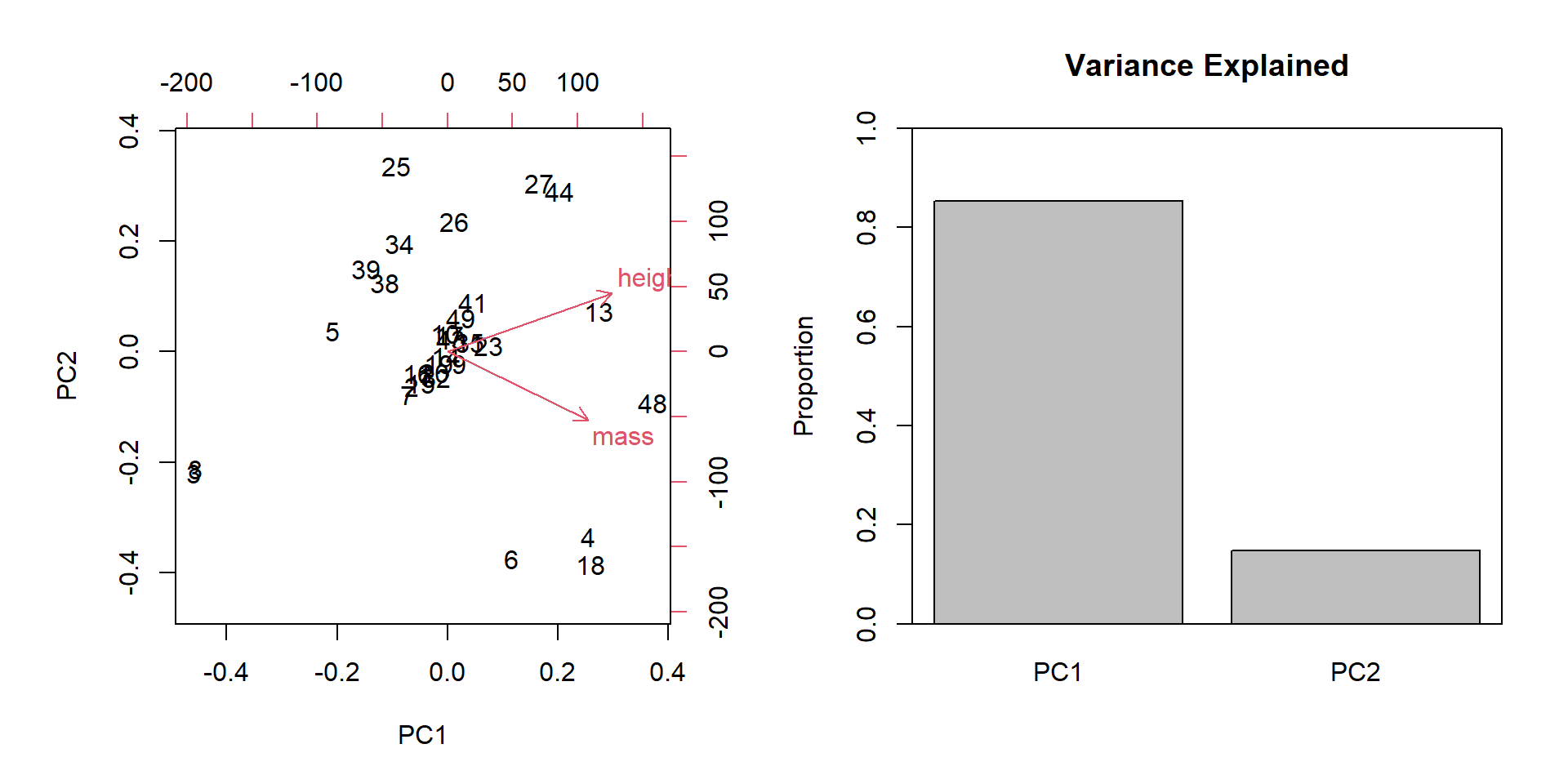
Aggregation
Attribute Aggregation
PCA
Code
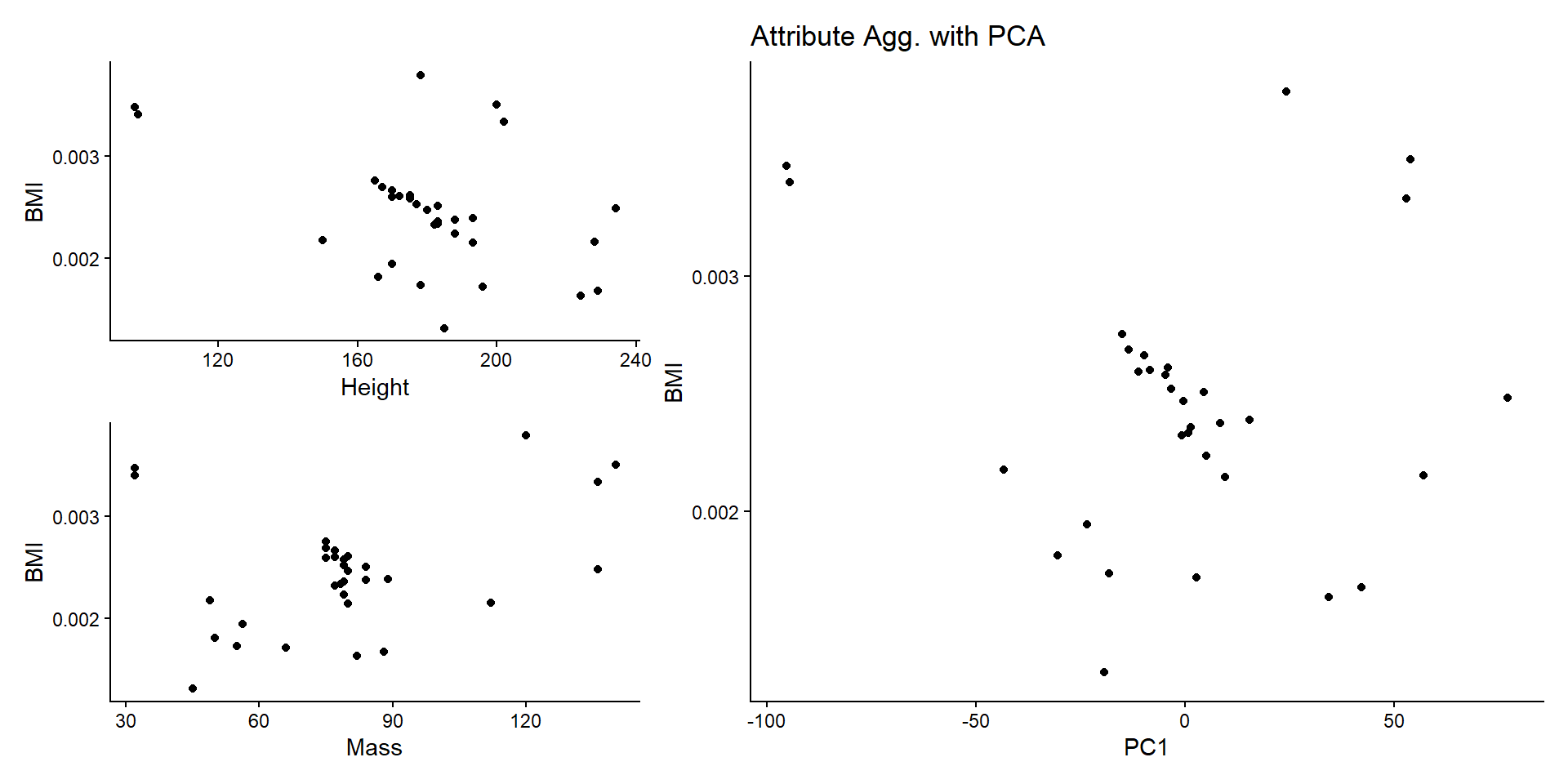
# 'sw' created earlier
a <- sw %>%
  ggplot(aes(x = height, y = bmi)) +
  geom_point() +
  labs(x = "Height", y = "BMI") +
  theme_classic()

b <- sw %>%
  ggplot(aes(x = mass, y = bmi)) +
  geom_point() +
  labs(x = "Mass", y = "BMI") +
  theme_classic()

c <- sw %>%
  ggplot(aes(x = pc1, y = bmi)) +
  geom_point() +
  labs(x = "PC1", y = "BMI") +
  ggtitle("Attribute Agg. with PCA") +
  theme_classic()

des <- "AC
        BC"

a + b + c + plot_layout(widths = c(0.4, 0.6),
                        design = des)