Lecture 10: Arranging Tables

Brian J. Smith

2026-02-24

Arranging Tables

This lecture is based on Chapter 7 of Visualization Analysis & Design.


“Arrange Tables”
Visualization Analysis & Design Cover

Arranging Tables


The goal of this chapter is to understand the visual encoding design choices for how to arrange tabular data spatially.
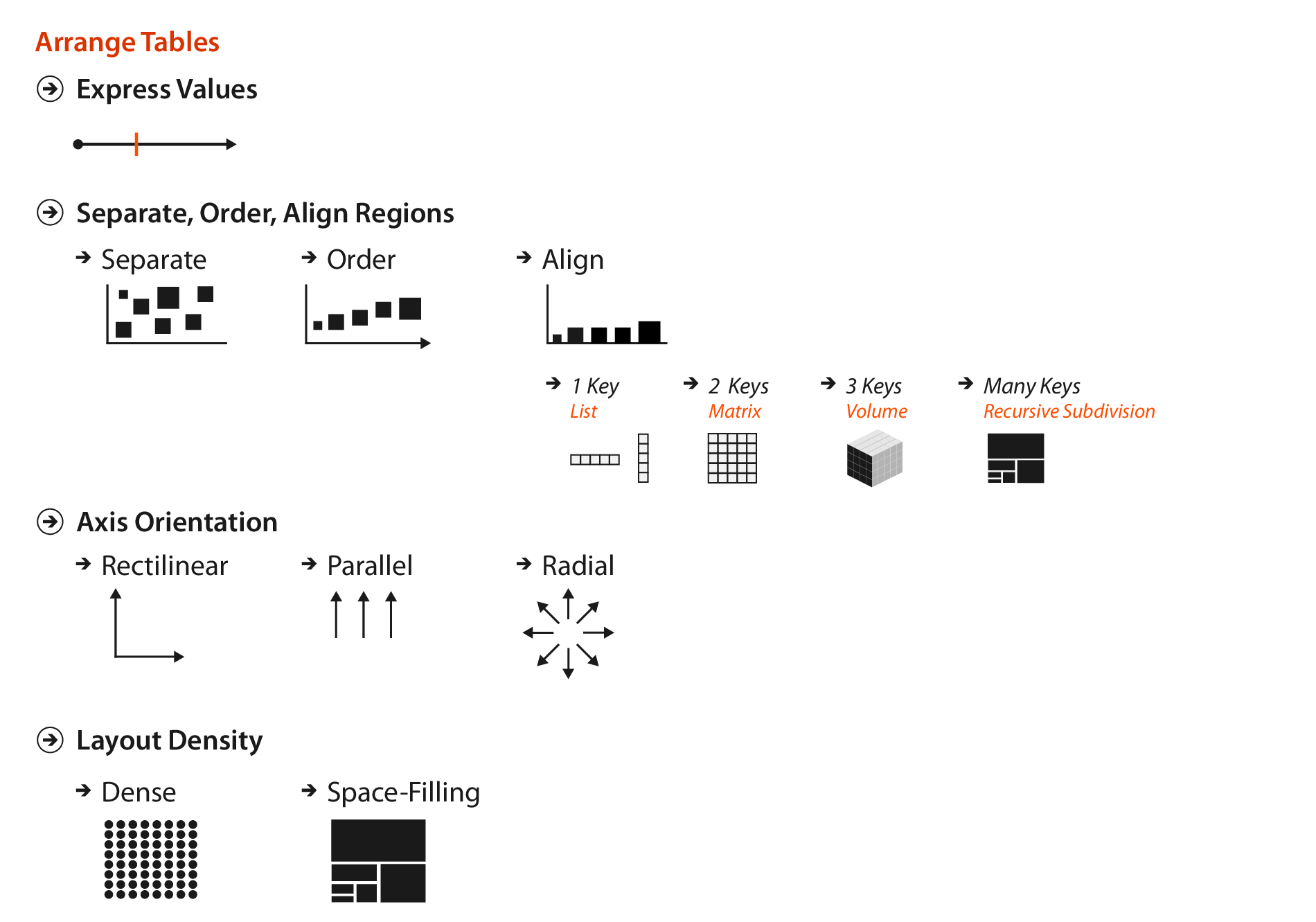
Figure 7.1

Why Arrange?

  • The arrange design choice covers all aspects of the use of spatial channels for visual encoding.
    • Use of space dominates the user’s mental model, so it is the most important choice.
    • The three highest ranked effectiveness channels for quantitative and ordered attributes are all related to spatial position:
      • Planar position against a common scale
      • Planar position along an unaligned scale
      • Length
    • The highest ranked effectiveness channel for categorical data relates to spatial position.
      • There are no non-spatial channels effective for all attribute types

Arrange by Keys and Values

  • Attributes can be categorized as key or value attributes:
    • Key attributes are independent attributes that can be used as a unique index to lookup items.
      • Can be categorical or ordinal.
    • Value attributes are dependent attributes giving the value of a cell.
      • Can be any type.
      • Unique values of categorical or ordinal attributes are known as levels.
        • Avoid overloading the word value.
        • Same term used for factor variables in R.

Arrange by Keys and Values

  • Design choices relate directly to the semantics of the table attributes, the number of keys and the number of values.
  • An idiom can show:
    • only values with no keys:
      • Scatter plot
    • one key and one value:
      • Bar chart
    • two keys and one value:
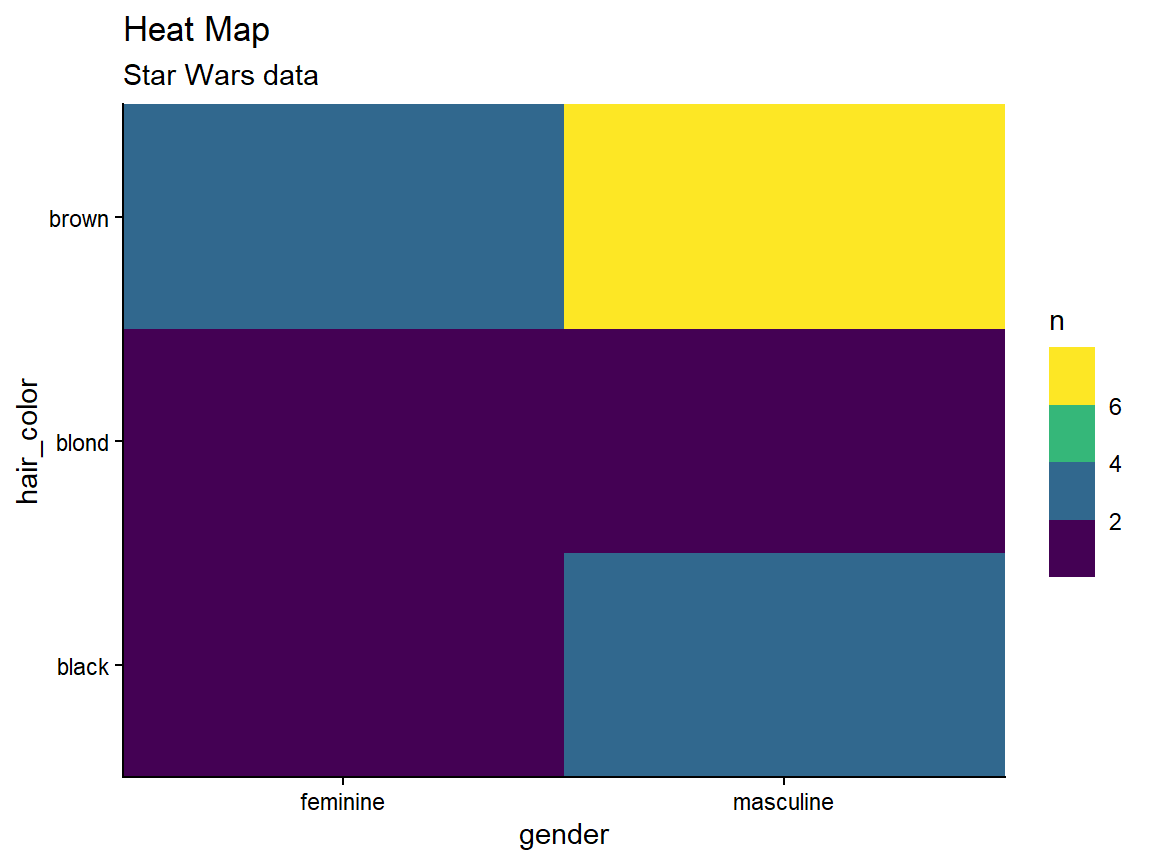
      • Heat map
    • many keys and many values:
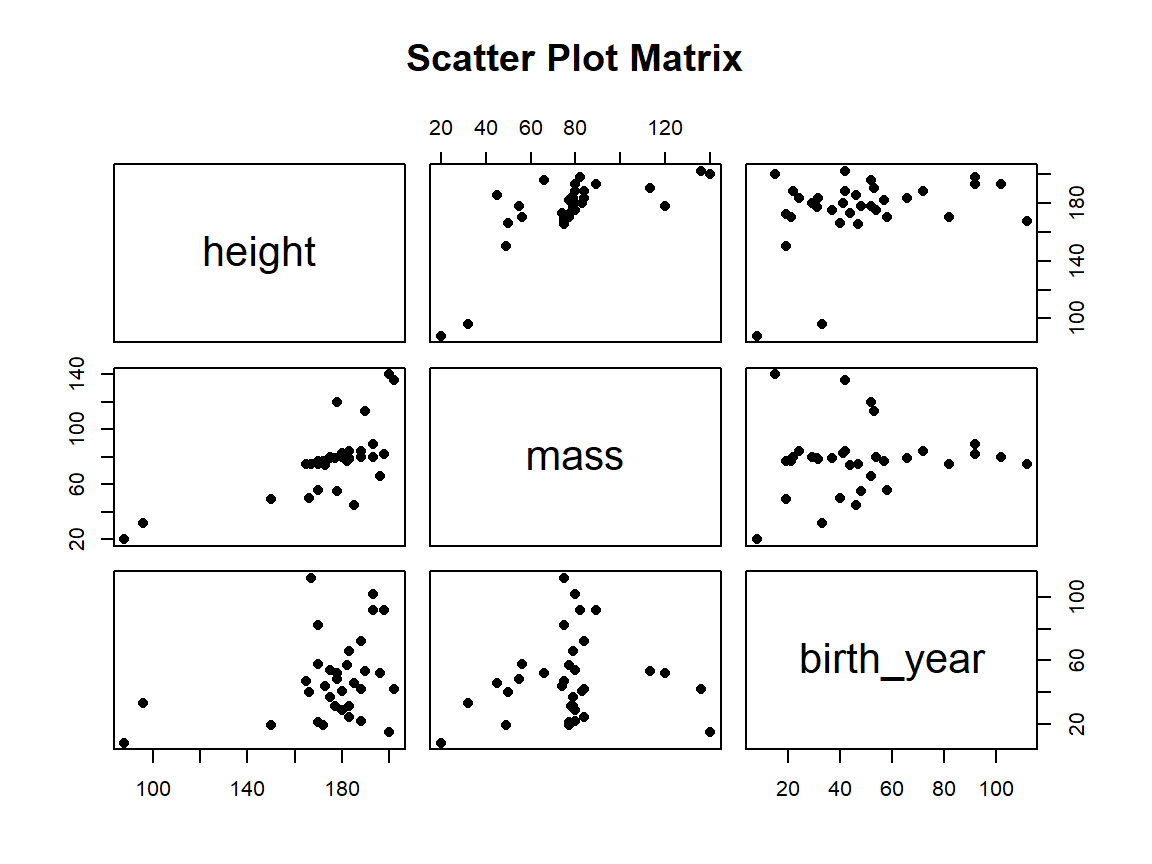
      • Scatter plot matrix
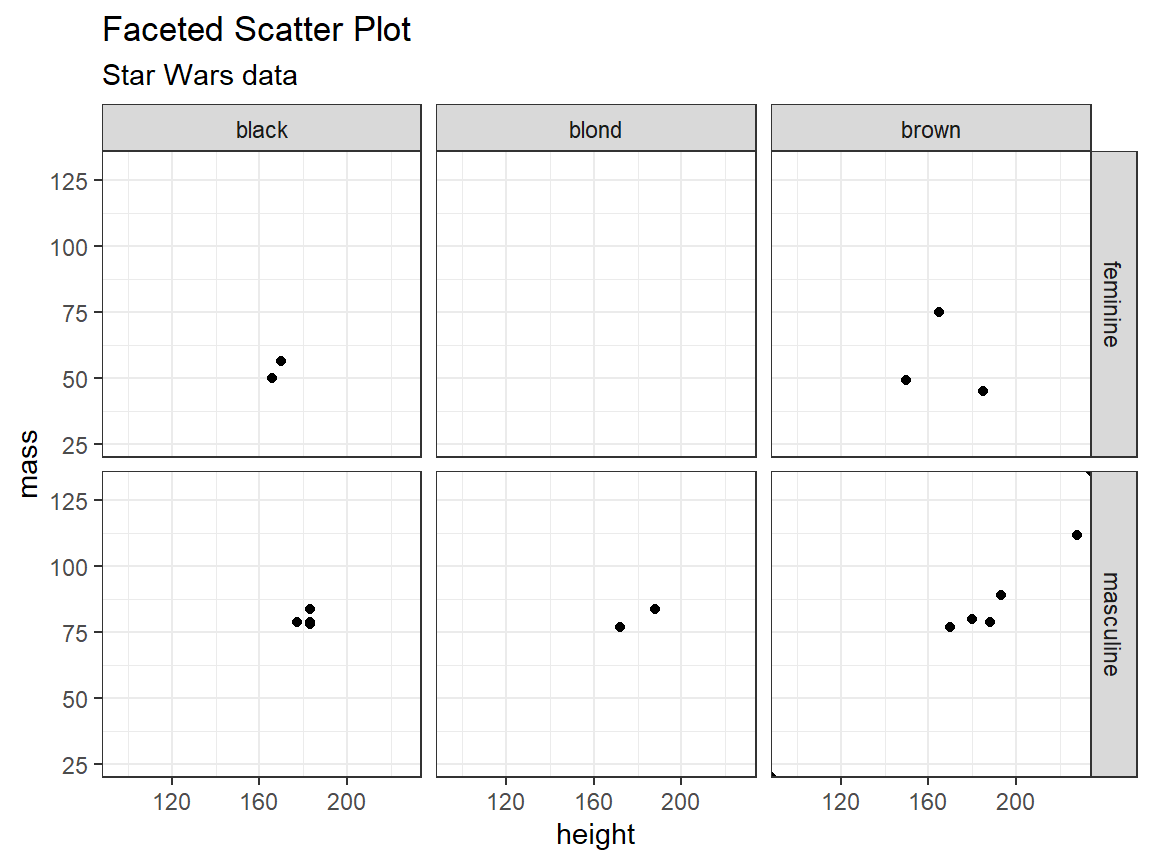
      • Faceted scatter plot

Express Quantitative Values

Scatter Plot

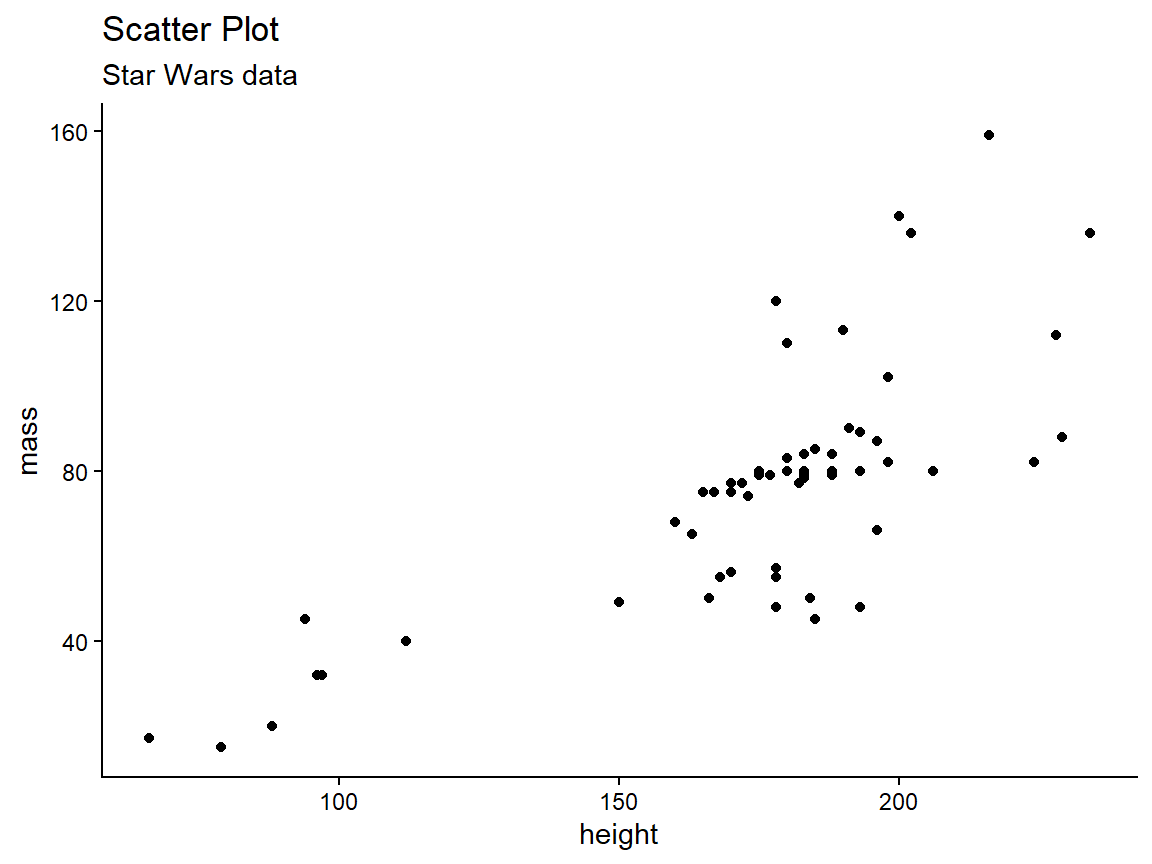
Two values, no keys
Code
library(dplyr)
library(ggplot2)
data("starwars")

starwars %>% 
  filter(mass < 500) %>% 
  ggplot(aes(x = height, y = mass)) +
  geom_point() +
  ggtitle("Scatter Plot", subtitle = "Star Wars data") +
  theme_classic()

Express Quantitative Values

Scatter Plots


Idiom Scatterplots
What: Data Table: two quantitative value attributes
How: Encode Express values with horizontal and vertical spatial position and point marks
Why: Task Find trends, outliers, distribution, correlation, locate clusters
Scale Items: hundreds

Express Quantitative Values

Scatter Plots

  • Good for finding trends.
    • Sometimes a trendline is superimposed.
  • Color coding can show an additional attribute.
  • Size coding can show yet another attribute.
    • Sometimes called a bubble plot.

Separate, Order, and Align

Categorical Regions

  • The principle of expressiveness would be violated if we encoded categorical attributes with spatial position.
  • Instead, we can use spatial region.
    • Regions are continuous, bounded areas that are distinct from each other.
    • Drawing items with the same level uses spatial proximity to encode their similarity.
      • Adheres to the expressiveness principle.
    • Still leaves flexibility for how to encoded information within a region.

Separate, Order, and Align

Categorical Regions

  • Distributing regions involves three operations:
    • Separating into regions.
    • Aligning the regions.
    • Ordering the regions.
  • Separating and ordering always happen.
  • Alignment is optional.
  • Separating should be done by the categorical attribute.
  • Ordering and alignment should be done by an ordered attribute.

Separate, Order, Align

  • With one key, use list alignment.
  • Results in one region per item.
  • Arrangement can be horizontal or vertical.

Separate, Order, Align

Bar Chart

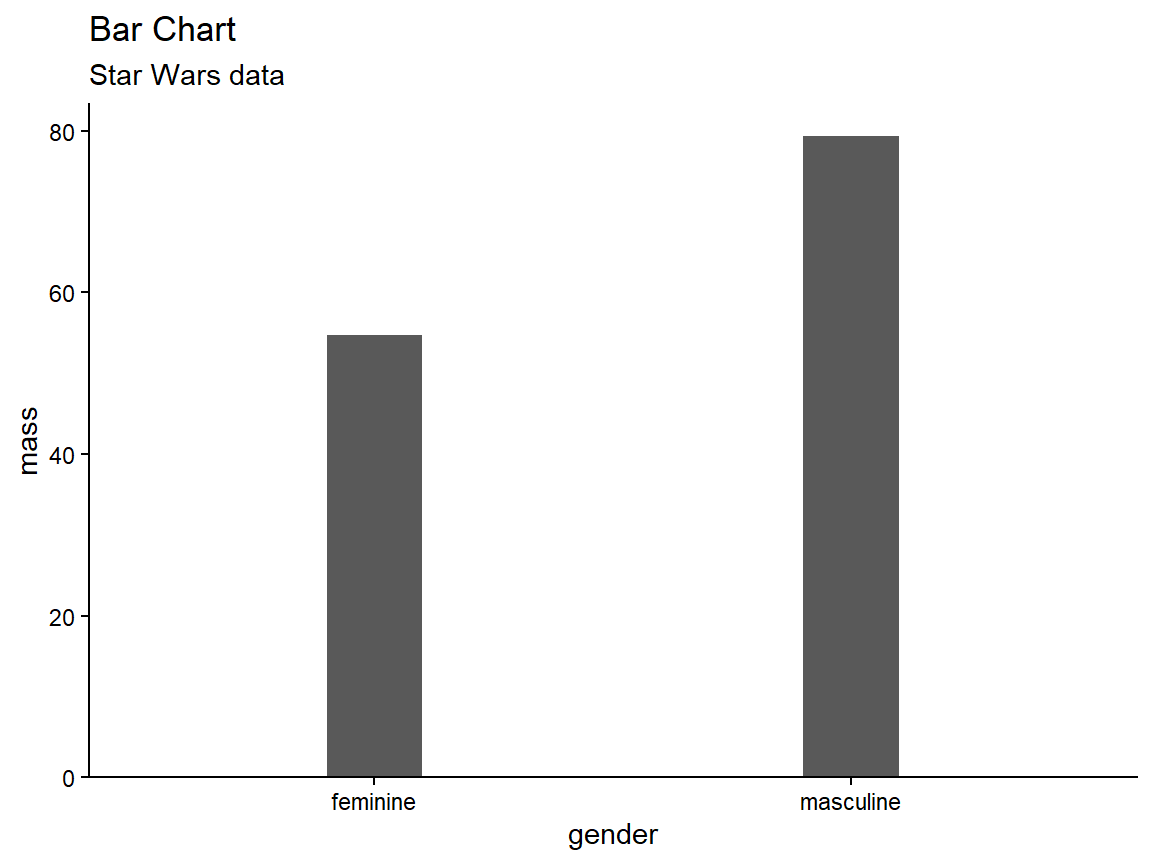
One key, one value
Code
starwars %>% 
  filter(mass < 500,
         !is.na(gender)) %>% 
  group_by(gender) %>% 
  summarize(mass = mean(mass)) %>% 
  ggplot(aes(x = gender, y = mass)) +
  geom_col(width = 0.2) +
  coord_cartesian(expand = c(bottom = FALSE)) +
  ggtitle("Bar Chart", subtitle = "Star Wars data") +
  theme_classic()

Separate, Order, Align

Bar Charts

  • Use a line mark, aligned in a common frame.
  • Encode a quantitative attribute with spatial position.
  • Encode a categorical attribute with spatial region.
  • Ordering can default to alphabetical or be data-driven.
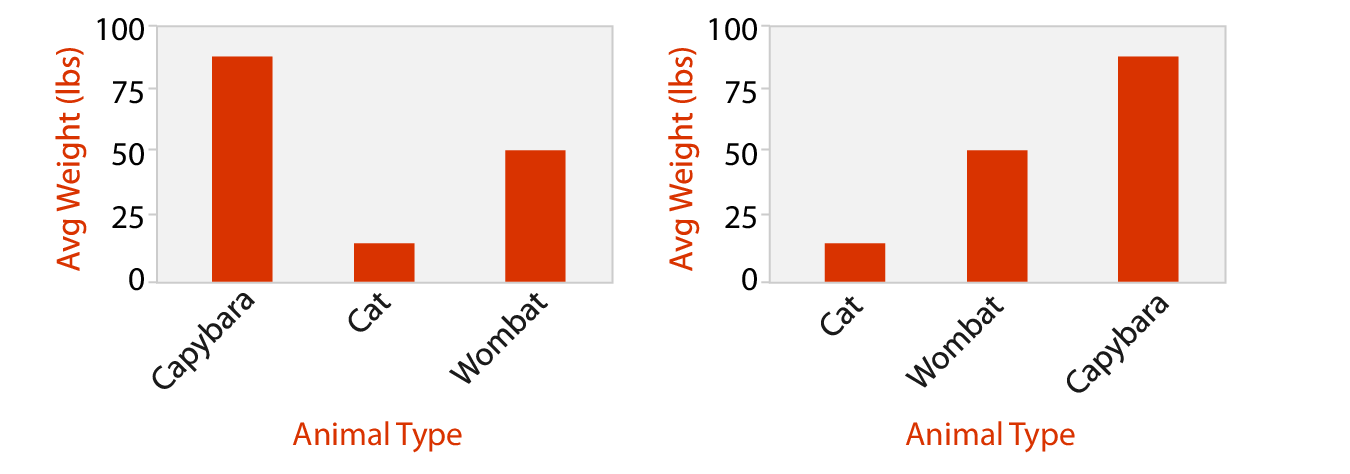
Fig. 7.4. Marks are ordered (a) alphabetically or (b) by weight.

Separate, Order, Align

Bar Charts


Idiom Bar Charts
What: Data Table: one quantitative value attribute, one categorical key attribute
How: Encode Line marks, express values with aligned position, separate values with region
Why: Task Lookup and compare values
Scale Key attribute: dozens to hundreds of levels

Separate, Order, Align

Stacked Bar Charts

Code
starwars %>% 
  filter(mass < 500,
         !is.na(gender),
         hair_color %in% c("black", "blond", "brown")) %>% 
  mutate(gender = factor(gender),
         hair_color = factor(hair_color)) %>% 
  group_by(gender, hair_color) %>% 
  summarize(mass = sum(mass)) %>% 
  ggplot(aes(x = gender, y = mass, fill = hair_color)) +
  geom_col() +
  xlab("Gender") +
  ylab("Total Mass") +
  scale_fill_discrete(name = "Hair Color") +
  coord_cartesian(expand = c(bottom = FALSE)) +
  ggtitle("Stacked Bar Chart", subtitle = "Star Wars data") +
  theme_bw()
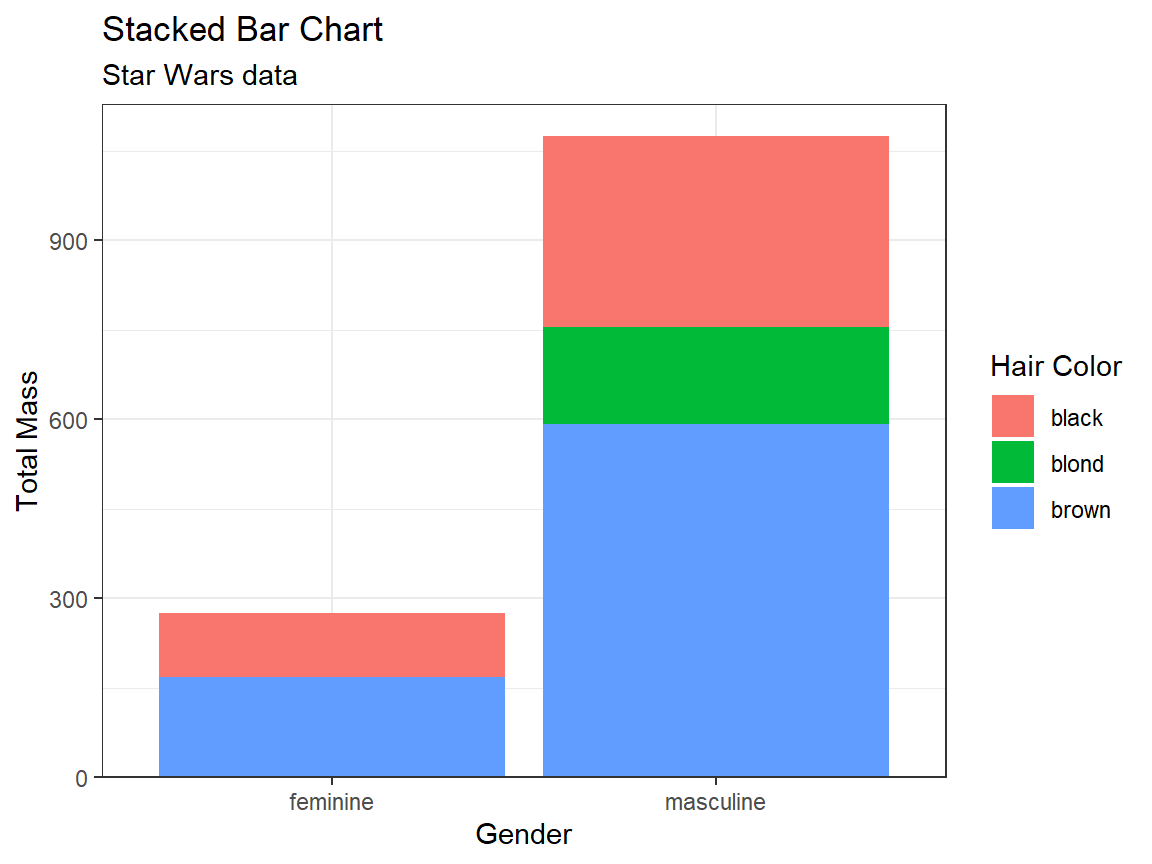
Separate, Order, Align

Stacked Bar Charts


Idiom Stacked Bar Charts
What: Data Multidimensional table: one quantitative value attribute, two categorical key attributes
How: Encode Bar glyph with length-coded subcomponents of value attribute for each category of secondary key attribute; separate bars by category of primary key attribute
Why: Task Part-to-whole relationship, lookup values, find trends
Scale Key attribute (main axis): dozens to hundreds of levels, Key attribute (stacked glyph axis): several to one dozen

Separate, Order, Align

Dot and Line Charts

  • Dot Chart
    • Like a bar chart, but uses point marks (standard use); or, like a scatter plot, but one axis is ordered categories.
    • One quantitative attribute using spatial position, one ordered attribute using spatial region.
  • Line Chart
    • A dot chart with lines connecting the dots to show trend.
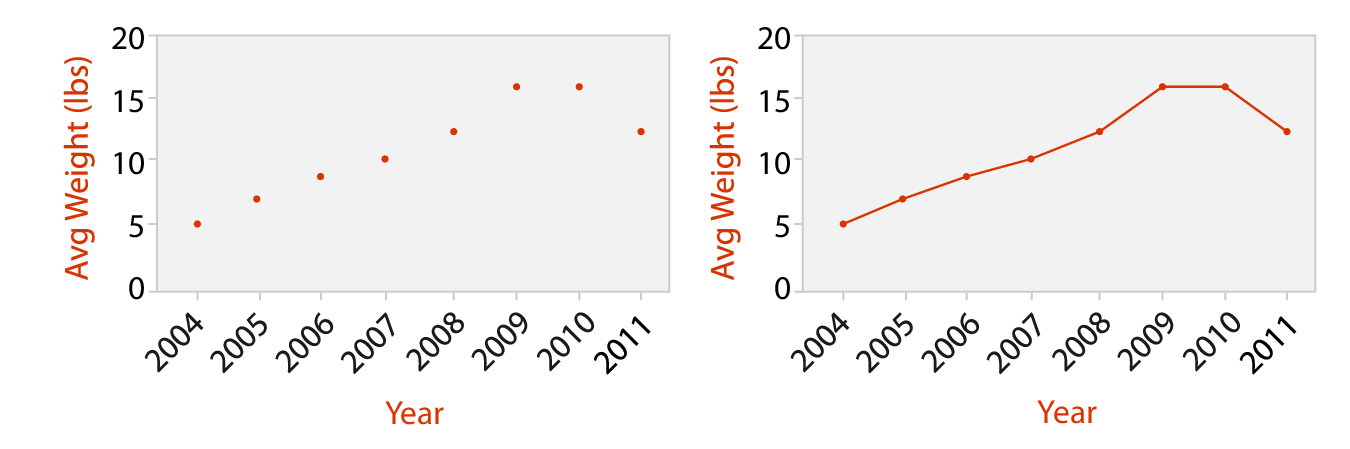
Fig. 7.8. Dot chart (a) versus line chart (b).

Separate, Order, Align

Dot and Line Charts

Idiom Dot Charts
What: Data Table: one quantitative value attribute, one ordered key attribute
How: Encode Express value attribute with aligned vertical position and point marks; separate/order into horizontal regions by key attribute

Separate, Order, Align

Dot and Line Charts

Idiom Line Charts
What: Data Table: one quantitative value attribute, one ordered key attribute
How: Encode Dot chart with connection marks between dots
Why: Task Show trend
Scale Key attribute: hundreds of levels

Separate, Order, Align

Bar vs. Line Charts

  • Bar charts encourage discrete comparisons.
  • Line charts encourage trend assessment.
    • Should not be used for categorical (unordered) attributes (top right)
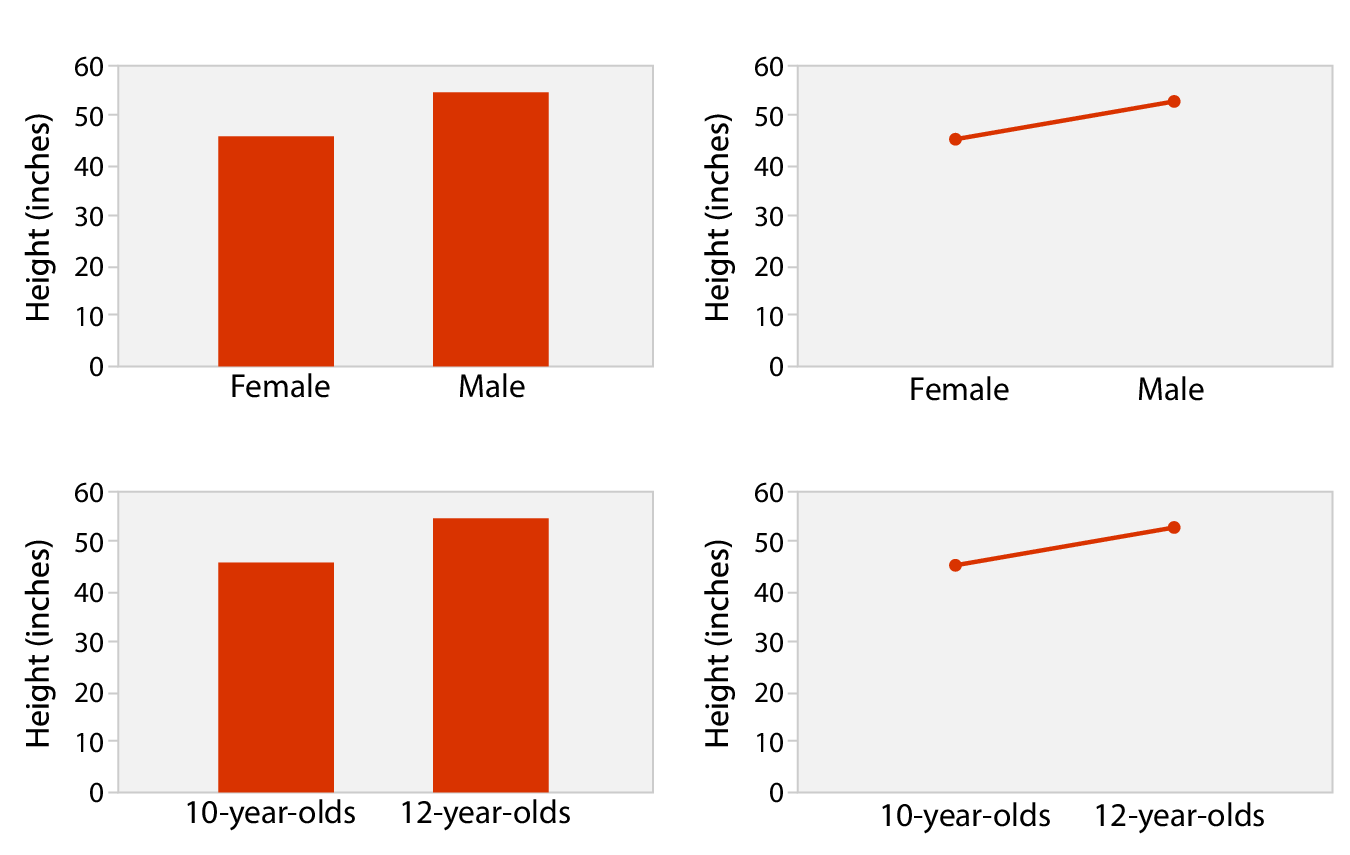
Fig. 7.9

Separate, Order, Align

Matrix Alignment

  • Distribute one key along rows and another along columns.
  • Heat maps are the simplest example.
  • Scatter Plot Matrices (SPLOMs) show all possible pairwise combinations.

Separate, Order, Align

Heat Map

Two keys, one value

Code
hm <- starwars %>% 
  filter(mass < 500,
         !is.na(gender),
         hair_color %in% c("black", "blond", "brown")) %>% 
  mutate(gender = factor(gender),
         hair_color = factor(hair_color)) %>% 
  group_by(gender, hair_color, .drop = FALSE) %>% 
  summarize(n = n()) %>% 
  ggplot(aes(x = gender, y = hair_color, fill = n)) +
  geom_tile() +
  coord_cartesian(expand = FALSE) +
  scale_fill_viridis_b() +
  ggtitle("Heat Map", subtitle = "Star Wars data") +
  theme_classic()

print(hm)
Separate, Order, Align

Heat Maps

Idiom Heat Maps
What: Data Table: two categorical key attributes, one quantitative value attribute
How: Encode 2D matrix alignment of area marks, diverging color map
Why: Task Find clusters, outliers; summarize
Scale Items: one million; categorical attribute levels: hundreds; quantitative attribute levels: 3 - 11

Separate, Order, Align

Scatter Plot Matrix

Many keys, many values
Code
xx <- starwars %>% 
  filter(mass < 500,
         birth_year < 200) %>% 
  select(height, mass, birth_year)

plot(xx, main = "Scatter Plot Matrix", sub = "Star Wars data",
     pch = 16)

Separate, Order, Align

Scatter Plot Matrix

Idiom SPLOMs
What: Data Table
What: Derived Ordered key attribute; list of original attributes
How: Encode Scatter Plots in 2D matrix alignment
Why: Task Find correlations, trends, outliers
Scale Attributes: one dozen; items: dozens to hundreds

Separate, Order, Align

Faceted Scatter Plot

Many keys, many values

Code
starwars %>% 
  filter(mass < 500,
         !is.na(gender),
         hair_color %in% c("black", "blond", "brown")) %>% 
  mutate(gender = factor(gender),
         hair_color = factor(hair_color)) %>% 
  ggplot(aes(x = height, y = mass)) +
  facet_grid(gender ~ hair_color) +
  geom_point() +
  coord_cartesian(expand = FALSE) +
  ggtitle("Faceted Scatter Plot", subtitle = "Star Wars data") +
  theme_bw()
Spatial Axis Orientation

  • Spatial axes can be oriented three ways:
    • Rectilinear
    • Parallel
    • Radial

Spatial Axis Orientation

Rectilinear Layouts

  • The most common layouts in data viz.
  • All the previous examples.
  • Limited to two perpendicular axes.
    • Or at most, three, although depth is a low-precision channel.

Spatial Axis Orientation

Parallel Layouts

  • Allow more than three attributes to be encoded with spatial position channel.
  • Parallel coordinates plots are used to show many attributes.
  • Use jagged lines that cross each axis exactly once.
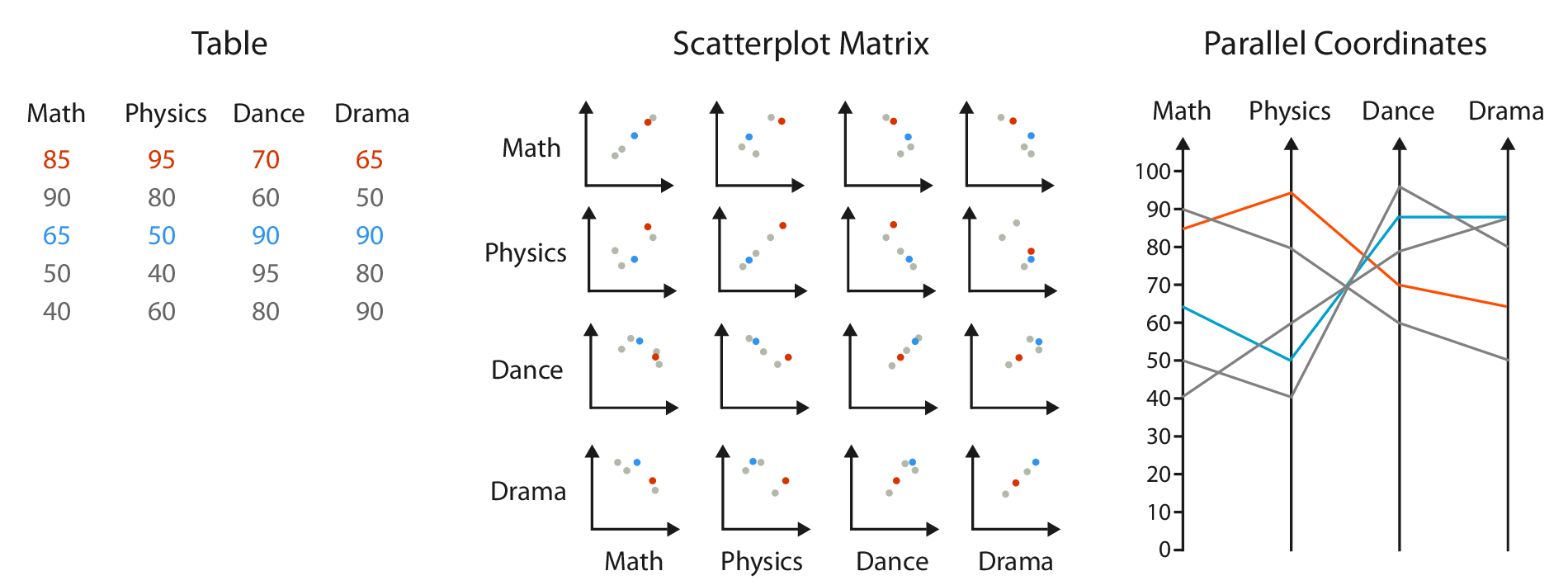
Fig. 7.12

Fig. 7.12

Spatial Axis Orientation

Parallel Layouts

  • Use two spatial dimensions:
    • one to show a quantitative value,
    • the other to lay out the multiple axes.

Fig. 7.12

Fig. 7.12

Spatial Axis Orientation

Parallel Layouts

  • Patterns are easily seen between neighboring axes, but not easily for distant axes.
    • Ordering axes is a critical decision.
  • These layouts have a long training time.
    • Most users are not familiar with these plots and don’t have intuition about the patterns.
    • Often used in conjunction with more familiar idioms, such as scatter plots (i.e., multiple views).

Spatial Axis Orientation

Radial Layouts

  • Items are distributed around a circle using the angle channel.
  • Also uses one ore more linear spatial channels.
  • Might imply one attribute is more important than another.
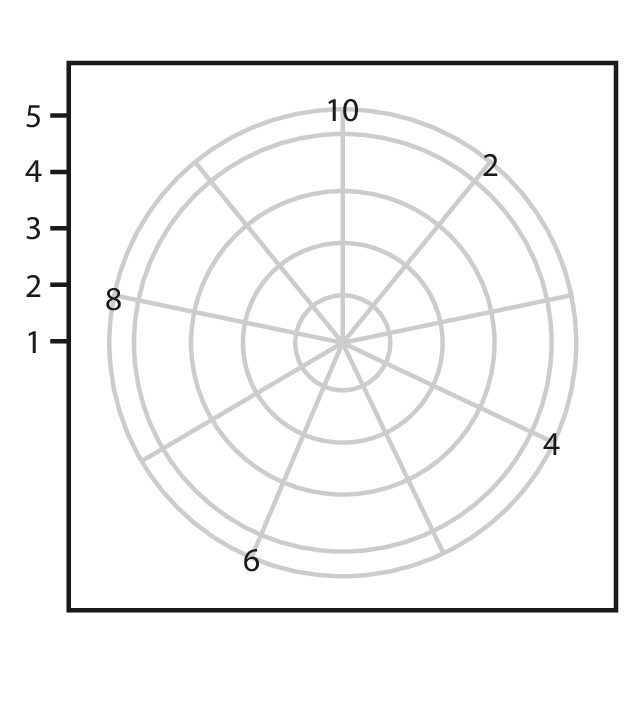
Fig. 7.15a

Fig. 7.15a

Spatial Axis Orientation

Radial Layouts

  • Natural coordinate system is polar coordinates.
    • One dimension is an angle.
    • The other dimension is a spatial position.
    • Mathematically completely equivalent to Cartesian coordinates.

Fig. 7.15a

Fig. 7.15a

Spatial Axis Orientation

Radial Layouts

  • While, mathematically, radial layout are equivalent to Cartesian coordinates, perceptually, they are not.
    • The angle channel is less accurately perceived than the rectilinear spatial position.
    • The angle channel is inherently cyclic.
      • Radial layouts may be more effective for showing periodic patterns.

Spatial Axis Orientation

Radial Layouts

Code
library(patchwork)

cyclic <- data.frame(x = seq(0, 2*pi, length.out = 300)) %>% 
  mutate(y = sin(4*x))

a <- ggplot(cyclic, aes(x = x, y = y)) +
  geom_line() +
  ggtitle("Rectilinear") +
  theme_bw()

b <- a +
  coord_polar() +
  scale_x_continuous(breaks = c(0, pi/2, pi, 3*pi/2, 2*pi),
                     labels = c("0", "π/2", "π", "3π/2", "2π")) +
  ggtitle("Radial")

a + b
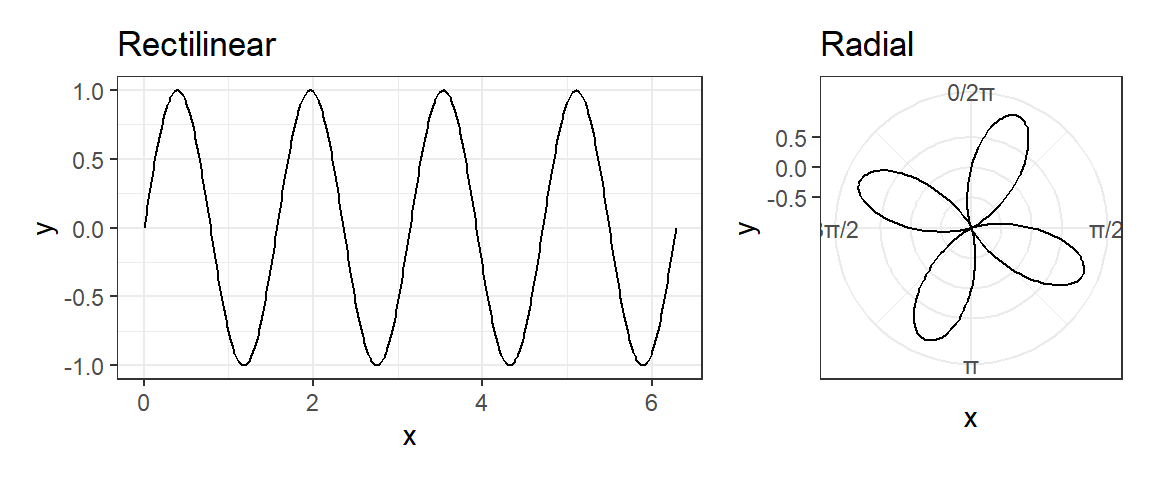
Side note, the polar transformation is a key idea behind the Fast Fourier Transform

Spatial Axis Orientation

Radial Bar Charts

Idiom Radial Bar Charts
What: Data Table: one quantitative attribute, one categorical attribute
How: Encode Length coding of line marks; radial layout

Spatial Axis Orientation

Rectilinear vs. Radial Layouts
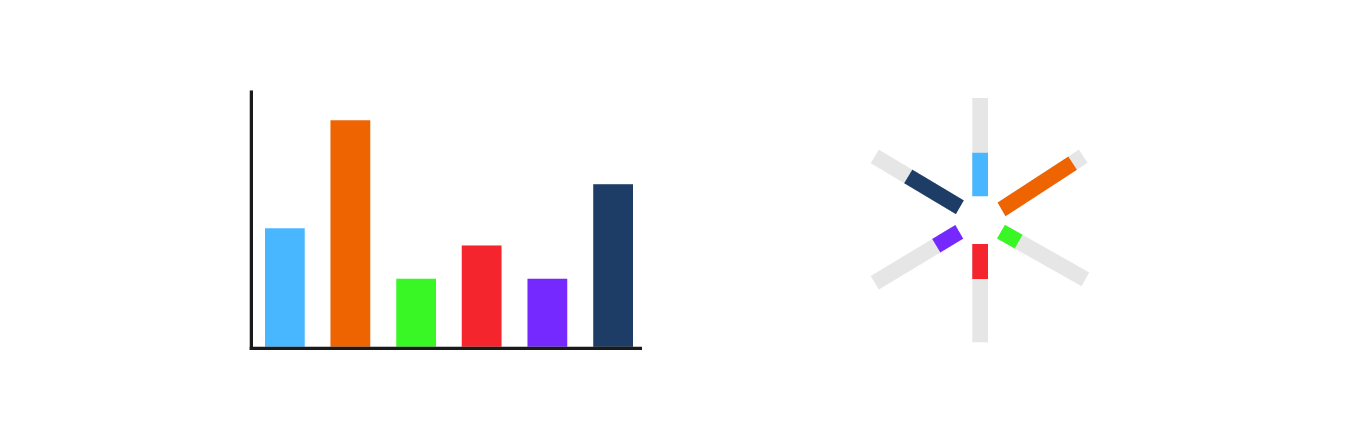
Fig. 7.16

Spatial Axis Orientation

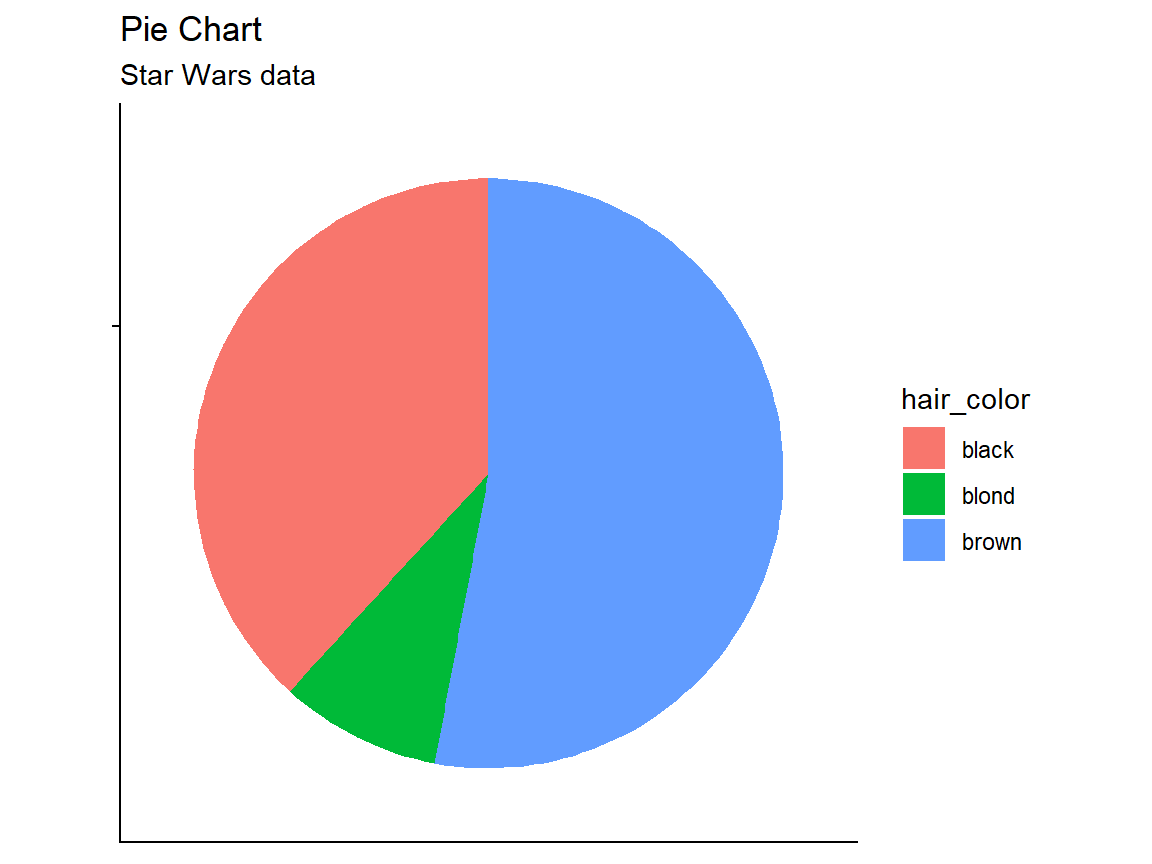
Pie Charts

Code
pie <- starwars %>% 
  filter(hair_color  %in% c("black", "blond", "brown")) %>% 
  group_by(hair_color) %>% 
  summarize(n = n()) %>% 
  ggplot(aes(x = "", y = n, fill = hair_color)) +
  geom_bar(stat = "identity", width = 1) +
  coord_polar("y", start = 0) +
  xlab(NULL) + 
  ylab(NULL) +
  ggtitle("Pie Chart", subtitle = "Star Wars data") +
  theme_classic() +
  theme(axis.text.x = element_blank())
print(pie)
Spatial Axis Orientation

Pie Charts

Idiom Pie Charts
What: Data Table: one quantitative attribute, one categorical attribute
Why: Task Part-whole relationship
How: Encode Area marks (wedges) with angle channel; radial layout
Scale One dozen categories

Spatial Axis Orientation

Polar Area Charts

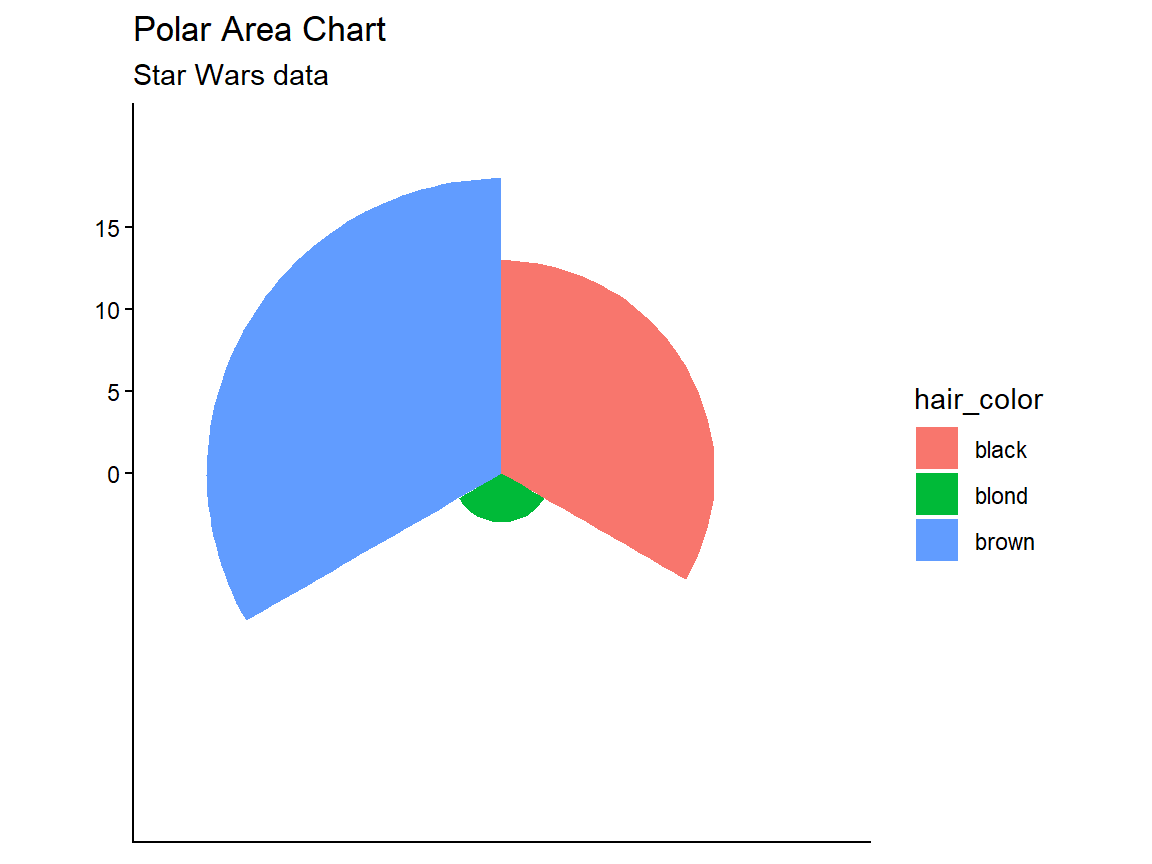
Code
pa <- starwars %>% 
  filter(hair_color  %in% c("black", "blond", "brown")) %>% 
  group_by(hair_color) %>% 
  summarize(n = n()) %>% 
  ggplot(aes(x = hair_color, y = n, fill = hair_color)) +
  geom_col(width = 1) +
  coord_polar() +
  xlab(NULL) + 
  ylab(NULL) +
  ggtitle("Polar Area Chart", subtitle = "Star Wars data") +
  theme_classic() +
  theme(axis.text.x = element_blank())
print(pa)
Spatial Axis Orientation

Polar Area Charts

Idiom Polar Area Charts
What: Data Table: one quantitative attribute, one categorical attribute
Why: Task Part-whole relationship
How: Encode Area marks (wedges) with angle channel; radial layout
Scale One dozen categories

Spatial Axis Orientation

Polar Area Charts

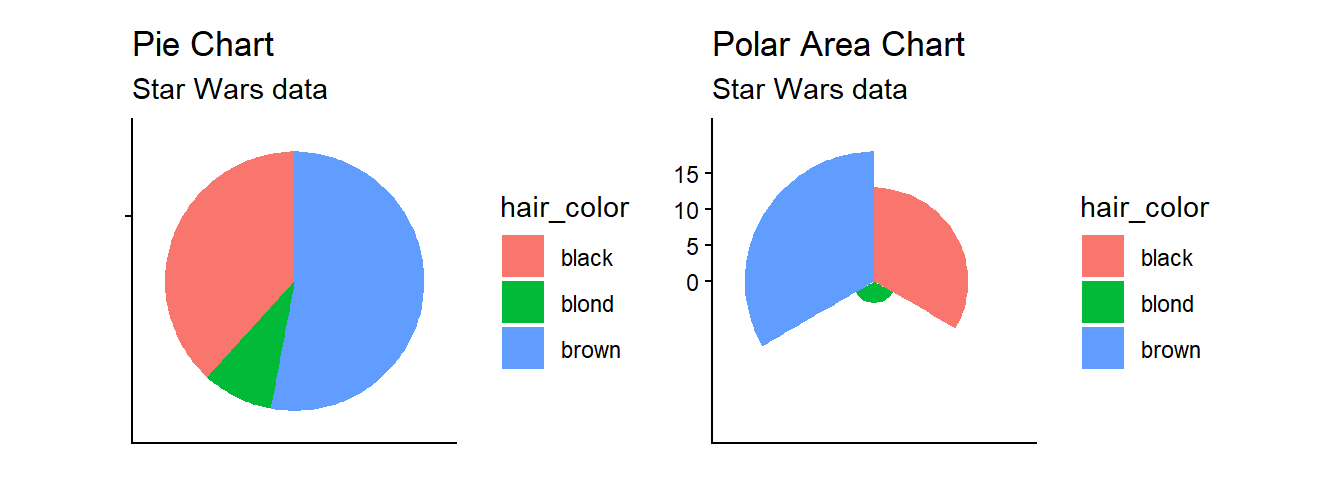
  • Pie charts require angle and area judgements.
  • Polar area charts are a more direct equivalent of bar charts.
Questions?


BCB5200 Home